After several months of use, I can confidently say this device has become a permanent fixture on my desk—and not just because I’m too busy to unplug it. The voice dictation works impressively well, saving both time and keyboard wear, while the video quality is sharp enough to make even Monday morning Zoom calls look respectable.
Whether you’re conferencing or simply attempting to look professional from your home office, the performance is consistently reliable. As someone with over 25–30 years in the IT industry, I don’t hand out praise lightly—but in this case, it’s well deserved.
In short, this is an excellent choice for everyday office use. Logitech continues its long-standing tradition of delivering quality products—thankfully, without requiring an IT support ticket to get started.
If only every piece of tech behaved this well, IT departments everywhere could finally take a proper coffee break.
Garmin
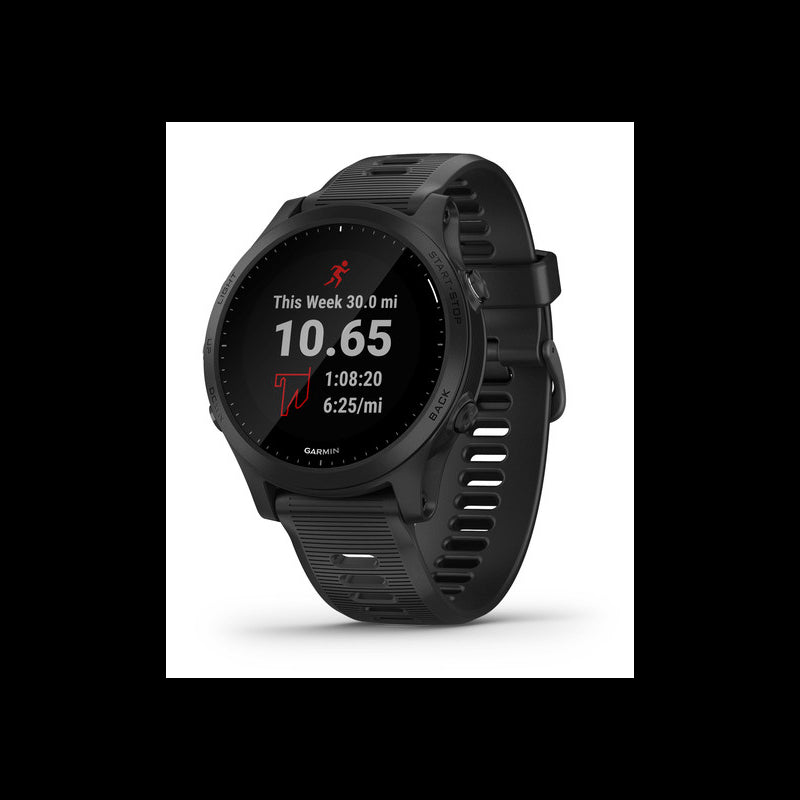
Garmin Forerunner 945 with GPS Multisport Running Watch - Black
Out of stock
Couldn't load pickup availability
Share
Garmin Forerunner 945 with GPS Multisport Running Watch - Black
Forerunner 945 is the GPS smartwatch designed for the driven, the qualifiers, and the elite. Forerunner 945 monitors your performance and even offers personalized insight, so you can train smarter, not harder. The smartwatch tracks your VO2 max and adjusts the value based on heat and altitude. Training status evaluates your recent exercise history and performance indicators to let you know if you're training productively, peaking, or overreaching. See how your workouts influence the development of endurance, speed, and power with aerobic and anaerobic training effect feedback. Recovery time helps you maximize the benefit of your efforts by predicting when you will be ready for your next tough challenge. You can even view your overall training load, which measures your exercise volume from the last 7 days and compares it to the optimal range for your fitness and recent training history. And — now for Forerunner 945 — training load focus sorts your recent training history into different categories based on activity structure and intensity.
The Forerunner 945 GPS smartwatch features Garmin Pay, which lets you pay for purchases with your watch. Use it just about anywhere you can tap your card to pay. Now you can leave your wallet behind without missing out on that post-run caffè latte. Just tap and go. With Forerunner 945, you can head out for a training session without being out of touch. Once paired with your compatible smartphone, you'll be able to receive text messages and see social media updates, emails, and more right on your wrist. Safety and tracking features make it easy to share your location with chosen contacts in case you need assistance — manually or automatically with built-in incident detection. For such a lightweight watch, you'll be surprised by everything the Forerunner 945 can track. It features multinetwork (GPS, GLONASS, and Galileo) satellite reception to track in more challenging environments than GPS alone. It features a wrist-based heart rate4 and a wrist-based Pulse Ox sensor5 which monitors blood oxygen saturation levels to support advanced sleep monitoring and altitude acclimation.
Whether you're running the city streets or riding densely covered trails, Forerunner 945 provides built-in mapping to help keep you on track
Whether you're training for a marathon or something even longer, create your own custom workouts, or download free ones that sync right to your watch

Change things up with ease, thanks to built-in activity profiles for running (indoor/outdoor), cycling (indoor/outdoor), swimming (pool/open water), cross-country skiing, paddle sports, trail running, and many more

Specifications:
| Lens Material: | Corning Gorilla Glass DX |
|---|---|
| Bezel Material: | fiber-reinforced polymer |
| Quick fit Watch Band Compatible: | Yes (22 mm) |
| Strap Material: | silicone |
| Physical Size: | 47 x 47 x 13.7 mm Fits wrists with a circumference of 130-220 mm |
| Display Size: | 1.2" (30.4 mm) diameter |
| Display Resolution: | 240 x 240 pixels |
| Display Type: | sunlight-visible, transflective memory-in-pixel (MIP) |
| Weight: | 50 g |
| Battery Life: | Smartwatch mode: up to 2 weeks GPS mode with music: up to 10 hours GPS mode without music: Up to 36 hours |
| Water rating: | 5 ATM |
| Memory/History: | 200 hours of activity data |
Tips for protecting your children online
In today's digital age, ensuring your children's safety while they browse the internet is paramount. As they explore the vast online world through smartphones, gaming consoles, laptops, and other devices, it's essential to implement measures to shield them from potentially harmful content and interactions. Here are some tips to help you safeguard your children online:
1. Communication is Key
Open and ongoing communication with your children about online safety is crucial. Discuss the potential dangers they may encounter online, such as pornography, cyberbullying, and violent content. Encourage them to come to you with any concerns or questions they may have.
2. Set Clear Boundaries
Establish clear rules and boundaries regarding internet usage. Define appropriate time limits for browsing and specify which websites and apps are off-limits. Make sure your children understand the consequences of violating these rules. You can also restrict some of these apps or online content utilizing device level parental controls explained below.
3. Utilize Parental Controls
Take advantage of the parental control features available on devices and internet browsers. These controls allow you to block access to specific websites, set age-appropriate content filters, and monitor your children's online activities. Familiarize yourself with the parental control options on smartphones, gaming consoles, and laptops to effectively manage your children's online experiences.
4. Educate Yourself
Stay informed about the latest trends and technologies related to online safety. Familiarize yourself with popular social media platforms, gaming communities, and messaging apps that your children may use, including the functions they provide. This knowledge will help you understand the potential risks and take appropriate action to protect your children.
5. Monitor Their Online Activities
Regularly monitor your children's online activities to ensure they are adhering to the rules and staying safe. Keep an eye on their browsing history, social media interactions, and messaging apps. Be vigilant for any signs of cyberbullying or exposure to inappropriate content.
6. Encourage Safe Online Behavior
Teach your children about the importance of practicing safe online behavior. Remind them never to share personal information, such as their full name, address, or phone number, with strangers online. Encourage them to think critically about the content they encounter and to report anything that makes them feel uncomfortable or unsafe.
7. Lead by Example
Be a positive role model for your children by demonstrating responsible and respectful online behavior yourself. Show them how to navigate the internet safely and responsibly, and emphasize the importance of treating others with kindness and empathy online.
8. Reporting abuse, making complaints and finding more information
For additional resources and guidance on online safety, visit the Australian e-Safety Commissioner's website at www.esafety.gov.au. Here, you'll find a wealth of information, including tips for parents, educational resources for children, and tools for reporting online abuse and harassment.
You can also report abuse through the website’s online form.
By following these tips and utilizing available resources, you can help keep your children safe from pornography, cyberbullying, violent content, and other unsafe material while they navigate the internet. Remember, proactive measures and open communication are key to fostering a safe and positive online environment for your family.