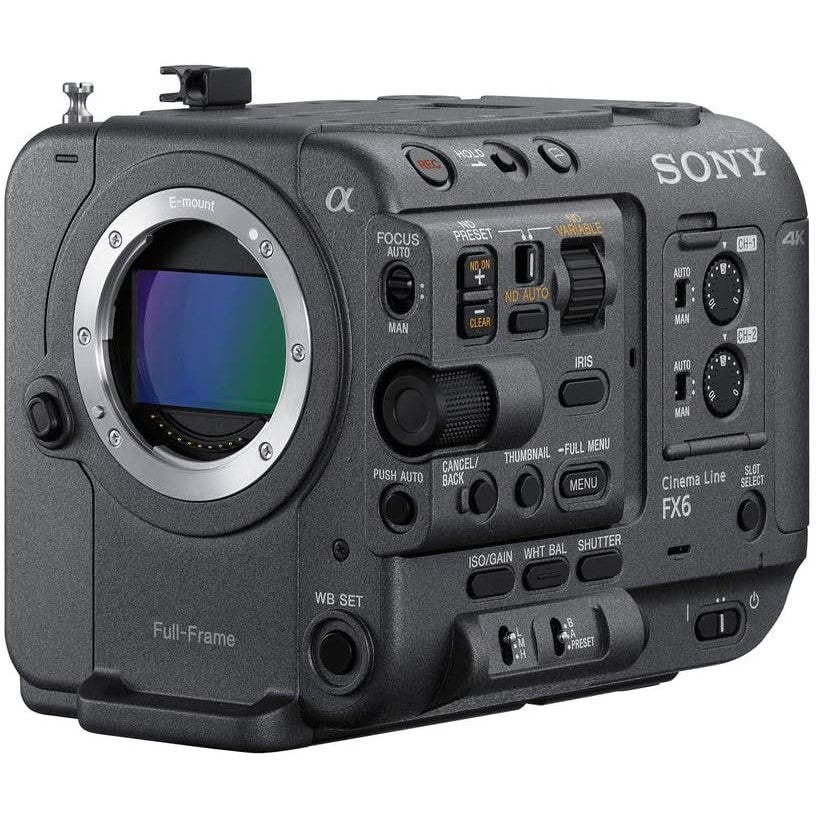
Sony FX6 Cinema Line Full-Frame Camera Body - Black
Features
Image sensor with blazing-fast readout speed
The back-illuminated full-frame Exmor R CMOS sensor, with 10.2 effective megapixels, boasts a blazingly fast data readout speed along with high sensitivity and wide dynamic range. An advanced color filter array boosts color reproduction accuracy, while focal plane phase-detection AF enables solid autofocus stability and excellent precision, all of which contribute to outstanding image quality.
High sensitivity, wide dynamic range
The full-frame 10.2-megapixel configuration enables high sensitivity with low noise throughout the camera's sensitivity range by optimizing the output signal from the sensor. Capture usable images in near total darkness with an impressive ISO expanded range up to 409600. The dynamic range is an impressively wide 15+ stops, for beautiful, true-to-life images without blown highlights. Together, the camera's high sensitivity and wide dynamic range expand your creative freedom during shoots.
4K High Frame Rate 120fps recording
Full-frame 4K (QFHD) recording at up to 120fps with autofocus is possible thanks to the high-speed readout capabilities of the image sensor and the powerful BIONZ XR processor. Even at high frame rates, ultra-detailed 4K (QFHD) images are captured using full-pixel readout without binning, for clear post-produced slow motion (up to 5x slower than real-time). The high-precision AF even allows beautiful full-frame bokeh to be achieved during slow-motion shooting, for impressive creative scope.
Recording movies with 10-bit depth and 4:2:2 color sampling
The FX6 is capable of 4K internal recordings, encoding 10-bit depth and 4:2:2 color sampling with All-Intra compression. This makes it possible to push your color grades further, stretching video out for ultimate HDR realism while still retaining natural gradation, for true editing freedom.
All-Intra internal recording
In addition to Long-GOP inter-frame compression, internal intra-frame (All-Intra) recording is supported. XAVC 4K Intra recording compresses each frame independently at a high bitrate, up to 600Mbps, so is ideal for capturing complex motion, and allowing maximum flexibility and playback performance during post-production. [1] All-Intra (All-I) [2] Long-GOP [3] Group of Pictures
16-bit RAW data output
Facilitating improved image quality and more flexible and efficient editing in post-production, the camera supports 16-bit RAW data output to an external recorder via SDI. RAW video output is 4096x2160 or 3840x2160 data from the image sensor with a choice of 120 / 100 / 59.94 / 50 / 29.97 / 25 / 24 / 23.98 frame rates
Real-time Eye AF and Face Detection AF
For a reliable focus on people, especially in unpredictable shooting environments such as news gathering, events, and documentary shooting, powerful Real-time Eye AF and Face Detection AF are built in. The real-time processing capability of the BIONZ XR image processing engine automatically maintains accurate eye focus on faces even in profile, looking up or down, or partially obscured - allowing you to concentrate fully on shot composition.
The 3.5-size LCD panel (1280 x 720 pixels) is mounted on an extended pedestal, and adjustable to a wide range of angles for easy video monitoring regardless of camera rigging and shooting angle. Mounting points are provided at three places on the handle and two on the body. With touch panel support, it also provides intuitive control for many camera settings, even where camera body controls are less accessible.
Smart grip
The FX6’s ergonomic Smart Grip is designed for powerful and comfortable camera control even during prolonged or dynamic shooting situations. Three customizable buttons, plus essential zoom and start/stop control and a custom dial suitable for Iris or Variable ND Filter control, are all positioned in easy grip reach. The freely-adjustable telescoping handle and grip angle are set with a single button, for effortless position changes without slowing production.
Two CFexpress Type A-compatible media slots
The camera's two media slots are compatible with CFexpress Type A cards as well as SDXC/SDHC cards supporting UHS-I and UHS-II speed classes CFexpress Type A cards are the next standard for compact storage with fast write/read speeds suitable for 4K movie recording at high bit rates. They are capable of quickly clearing camera buffers even when high volumes of movie data are being generated.
DIMENSIONS (W X H X D) (BODY WITHOUT PROTRUSIONS) (APPROX.): 114 x 116 x 153 mm(4 1/2 x 4 5/8 x 6 1/8 inch) (body without protrusions)
Power
POWER REQUIREMENTS: DC 19.5V
POWER CONSUMPTION: Approx. 18.0 W (while recording XAVC-I QFHD 59.94p, SEL24105G Lens, Viewfinder ON, not using external device)
BATTERY OPERATING TIME: Approx. 105min. with BP-U35 battery (while recording XAVC-I QFHD 59.94p, SEL24105G Lens, Viewfinder ON, not using external device), Approx. 215min. with BP-U70 battery (while recording XAVC-I QFHD 59.94p, SEL24105G Lens, Viewfinder ON, not using external device)
Operation
OPERATING TEMPERATURE: 0°C to 40°C, 32°F to 104°F
STORAGE TEMPERATURE: -20°C to +60°C, -4°F to +140°F
Recording Format (Video)
XAVC INTRA XAVC-I DCI4K 23.98p mode:VBR, MAX bit rate 240 Mbps, MPEG-4 AVC/H.264, XAVC-I DCI4K 24p mode:VBR, MAX bit rate 240 Mbps, MPEG-4 AVC/H.264, XAVC-I DCI4K 25p mode:VBR, MAX bit rate 250 Mbps, MPEG-4 AVC/H.264, XAVC-I DCI4K 29.97p mode:VBR, MAX bit rate 300 Mbps, MPEG-4 AVC/H.264, XAVC-I DCI4K 50p mode:VBR, MAX bit rate 500 Mbps, MPEG-4 AVC/H.264, XAVC-I DCI4K 59.94p mode:VBR, MAX bit rate 600 Mbps, MPEG-4 AVC/H.264, XAVC-I HD 23.98p mode:CBG, MAX bit rate 89Mbps, MPEG-4 AVC/H.264, XAVC-I HD 25p mode:CBG, MAX bit rate 112Mbps, MPEG-4 AVC/H.264, XAVC-I HD 29.97p mode:CBG, MAX bit rate 111 Mbps, MPEG-4 AVC/H.264, XAVC-I HD 50p mode:CBG, MAX bit rate 223 Mbps, MPEG-4 AVC/H.264, XAVC-I HD 59.94p mode:CBG, MAX bit rate 222 Mbps, MPEG-4 AVC/H.264, XAVC-I QFHD 23.98p mode:VBR, MAX bit rate 240 Mbps, MPEG-4 AVC/H.264, XAVC-I QFHD 25p mode:VBR, MAX bit rate 250 Mbps, MPEG-4 AVC/H.264, XAVC-I QFHD 29.97p mode:VBR, MAX bit rate 300 Mbps, MPEG-4 AVC/H.264, XAVC-I QFHD 50p mode:VBR, MAX bit rate 500 Mbps, MPEG-4 AVC/H.264, XAVC-I QFHD 59.94p mode:VBR, MAX bit rate 600 Mbps, MPEG-4 AVC/H.264
XAVC LONG: XAVC-L HD 29.97p/25p/23.98p/59.94p/50p mode:VBR, MAX bit rate 35 Mbps, MPEG-4 H.264/AVC, XAVC-L HD 29.97p/25p/23.98p/59.94p/50p mode:VBR, MAX bit rate 50 Mbps, MPEG-4 H.264/AVC, XAVC-L QFHD 29.97p/25p/23.98p mode:VBR, MAX bit rate 100 Mbps, MPEG-4 H.264/AVC, XAVC-L QFHD 59.94p/50p mode:VBR, MAX bit rate 150 Mbps, MPEG-4 H.264/AVC
Recording Format (Audio)
RECORDING FORMAT (AUDIO) LPCM 24 bits, 48 kHz, 4 channels
Recording Frame Rate
XAVC INTRA: XAVC-I DCI4K mode:4096 x 2160/59.94P, 50P, 29.97P, 23.98P, 25P, 24P, XAVC-I HD mode:1920 x 1080/59.94P, 50P, 29.97P, 23.98P, 25P, XAVC-I QFHD mode:3840 x 2160/59.94P, 50P, 29.97P, 23.98P, 25P
XAVC LONG: XAVC-L HD 35 mode:1920 x 1080/59.94P, 50P, 29.97P, 23.98P, 25P, XAVC-L HD 50 mode:1920 x 1080/59.94P, 50P, 29.97P, 23.98P, 25P, XAVC-L QFHD mode:3840 x 2160/59.94P, 50P, 29.97P, 23.98P, 25P
FREQUENCY BAND: 2.4 GHz bandwidth, 5.2/5.3/5.6/5.8 GHz bandwidth
SECURITY WEP:/WPA-PSK/WPA2-PSK
NFC: NFC Forum Type 3 Tag compliant
Supplied Accessories
SUPPLIED ACCESSORIES: AC Adaptor(1), Battery charger(1), Battery pack(1), Before Using This Unit(1), Cold shoe kit(1), Grip remote control(1), Handle(1), Handle connector cap(1), LCD hood(1), LCD monitor(1), Lens mount cap(1), Power cord(1), USB-C cable(1)
BRAND NEW ONE YEAR WARRANTY STOCK IN AUSTRALIA AUSTRALIAN SELLER
Tips for protecting your children online
In today's digital age, ensuring your children's safety while they browse the internet is paramount. As they explore the vast online world through smartphones, gaming consoles, laptops, and other devices, it's essential to implement measures to shield them from potentially harmful content and interactions. Here are some tips to help you safeguard your children online:
1. Communication is Key
Open and ongoing communication with your children about online safety is crucial. Discuss the potential dangers they may encounter online, such as pornography, cyberbullying, and violent content. Encourage them to come to you with any concerns or questions they may have.
2. Set Clear Boundaries
Establish clear rules and boundaries regarding internet usage. Define appropriate time limits for browsing and specify which websites and apps are off-limits. Make sure your children understand the consequences of violating these rules. You can also restrict some of these apps or online content utilizing device level parental controls explained below.
3. Utilize Parental Controls
Take advantage of the parental control features available on devices and internet browsers. These controls allow you to block access to specific websites, set age-appropriate content filters, and monitor your children's online activities. Familiarize yourself with the parental control options on smartphones, gaming consoles, and laptops to effectively manage your children's online experiences.
4. Educate Yourself
Stay informed about the latest trends and technologies related to online safety. Familiarize yourself with popular social media platforms, gaming communities, and messaging apps that your children may use, including the functions they provide. This knowledge will help you understand the potential risks and take appropriate action to protect your children.
5. Monitor Their Online Activities
Regularly monitor your children's online activities to ensure they are adhering to the rules and staying safe. Keep an eye on their browsing history, social media interactions, and messaging apps. Be vigilant for any signs of cyberbullying or exposure to inappropriate content.
6. Encourage Safe Online Behavior
Teach your children about the importance of practicing safe online behavior. Remind them never to share personal information, such as their full name, address, or phone number, with strangers online. Encourage them to think critically about the content they encounter and to report anything that makes them feel uncomfortable or unsafe.
7. Lead by Example
Be a positive role model for your children by demonstrating responsible and respectful online behavior yourself. Show them how to navigate the internet safely and responsibly, and emphasize the importance of treating others with kindness and empathy online.
8. Reporting abuse, making complaints and finding more information
For additional resources and guidance on online safety, visit the Australian e-Safety Commissioner's website at www.esafety.gov.au. Here, you'll find a wealth of information, including tips for parents, educational resources for children, and tools for reporting online abuse and harassment.
You can also report abuse through the website’s online form.
By following these tips and utilizing available resources, you can help keep your children safe from pornography, cyberbullying, violent content, and other unsafe material while they navigate the internet. Remember, proactive measures and open communication are key to fostering a safe and positive online environment for your family.
We recently received our order for a 9th Gen IPad and was impressed with the price, delivery time and the quality of the article ordered
It was difficult to tell the difference between the one received and a new one.
Wife was very pleased.