Great product. I have to buy the adapter separately for Australia as this came with the japanese plug.
Great, excellent quality product. Delivered in record time. Highly recommended.
$0.00 AUD
Roborock
Out of stock
Couldn't load pickup availability
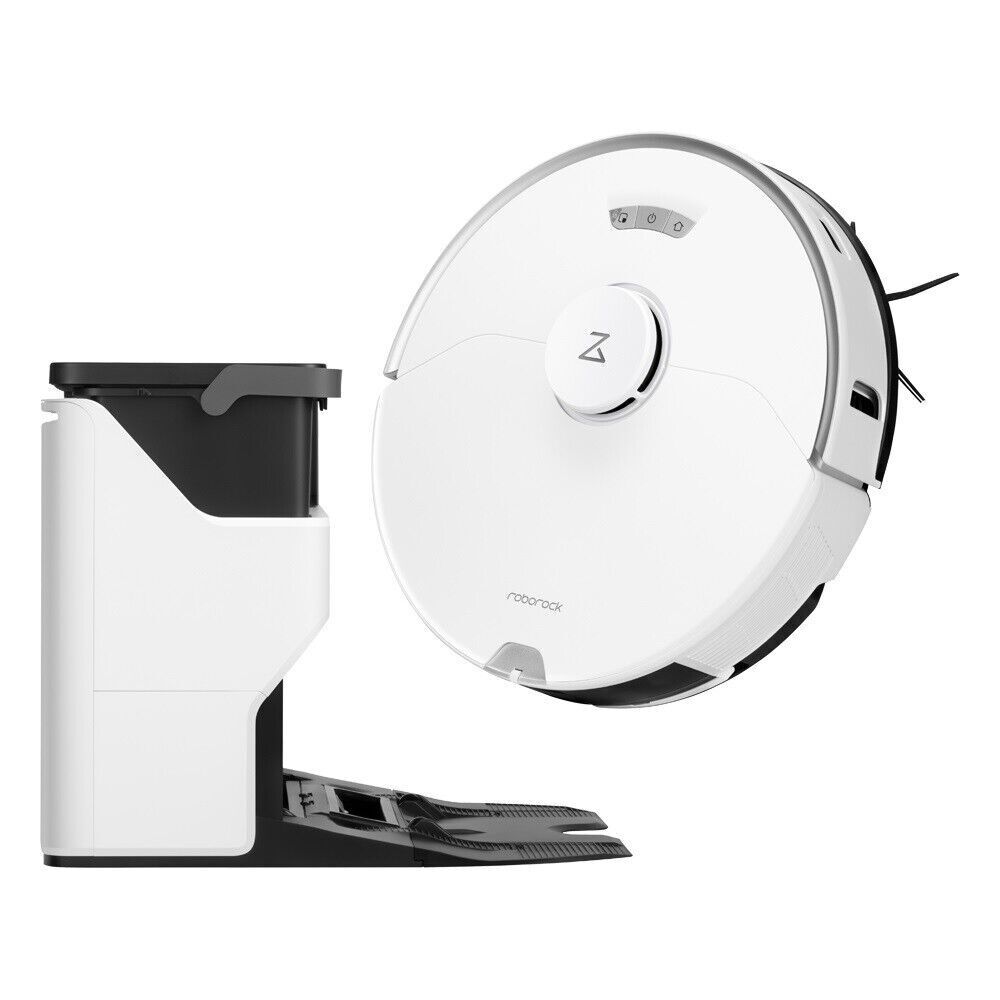
Roborock S7 Pro Ultra Robotic Vacuum Cleaner and Empty Wash Fill Dock - White
Vacuum more. Mop More. While emptying less, cleaning less, and doing less. The Roborock S7 Pro Ultra combines the S7 Pro robot and the acclaimed Roborock Empty Wash Fill Dock to unleash another level of floor cleaning automation.
The Empty Wash Fill dock is Roborock’s most advanced dock to date, unleashing a world of new conveniences for those who demand the cleanest of floors.

The suction power has been cranked up. All the way up. From a maximum of 2500 Pa on the Roborock S7 all the way to 5100 Pa on the S7 Pro Ultra. That’s more than double the power. Fire up the Max+ mode, and all that power is yours.
A durable all-rubber brush effectively resists hair tangles. It stays closer to even uneven floors through its multi-plane floating mechanism.

Experience robot mopping like never before, with VibraRise sonic vibration technology that scrubs your floors not hundreds, but thousands of times per minute. 3,000 times per minute to be exact. Combined with consistently high pressure, the VibraRise system removes dried stains 30% more effectively than traditional robot mops and leaves less dirt behind than spinning mops.

When you want to mop, you don’t want to have to find and attach a mop cloth. Let alone the hassle of swapping your robot’s side brushes for mops. With VibraRise, you don’t have to. With a tap on your phone, you can switch from vacuuming to mopping and back as often as you like.

If you’ve got beautifully cleaned living room floors but your kitchen needs to be mopped, do you want that kitchen dirt dragged across your living room No. Using VibraRise, you can mop your kitchen and only your kitchen. Afterward, the robot will lift the mop and cruise back to its dock, leaving floors spotless.

Recreate your home, along with all your furniture and floor types, right in the Roborock app. Automatically. When mapping is done, you can add your furniture, including beds, sofas, tables, and more. Need to clean around the bed after a lazy breakfast? Just tap on your bed.

Customize cleaning to match the needs of each room, and S7 Pro Ultra will automatically adapt as it cleans, from high scrubbing intensity and maximum suction in the kitchen to quiet mode and no mopping outside the nursery and everything in between.

Do you cook a lot Find yourself always turning up the suction and sending the robot to the Kitchen Do your pets randomly knock food out of their bowls Set a Routine for these frequent but ad-hoc tasks then trigger the cleanup with a tap. You can also add schedules to any routine you set.
Voice Control
Amazon Alexa, Google Home, and Siri Shortcuts support let you command your robot with the power of your voice.

Note: This robot vacuum will connect to 2.4GHz only.
| Color |
White |
|---|---|
| Robot dimensions |
353 x 350 x 96.5 mm |
| Dimensions of the station |
422 x 504 x 420 mm |
| Max suction power |
5,100 Pa |
| Noise level |
67 dB in balanced mode |
| Capacity |
Dust tank 400 ml | Water tank 200 ml |
| Mapping & Navigation |
|
| Battery |
5,200 mAh | 180 minutes of autonomy |
| Voice assistants |
Amazon, Alexa, Google Home and Siri |
| Features |
|
In today's digital age, ensuring your children's safety while they browse the internet is paramount. As they explore the vast online world through smartphones, gaming consoles, laptops, and other devices, it's essential to implement measures to shield them from potentially harmful content and interactions. Here are some tips to help you safeguard your children online:
Open and ongoing communication with your children about online safety is crucial. Discuss the potential dangers they may encounter online, such as pornography, cyberbullying, and violent content. Encourage them to come to you with any concerns or questions they may have.
Establish clear rules and boundaries regarding internet usage. Define appropriate time limits for browsing and specify which websites and apps are off-limits. Make sure your children understand the consequences of violating these rules. You can also restrict some of these apps or online content utilizing device level parental controls explained below.
Take advantage of the parental control features available on devices and internet browsers. These controls allow you to block access to specific websites, set age-appropriate content filters, and monitor your children's online activities. Familiarize yourself with the parental control options on smartphones, gaming consoles, and laptops to effectively manage your children's online experiences.
Stay informed about the latest trends and technologies related to online safety. Familiarize yourself with popular social media platforms, gaming communities, and messaging apps that your children may use, including the functions they provide. This knowledge will help you understand the potential risks and take appropriate action to protect your children.
Regularly monitor your children's online activities to ensure they are adhering to the rules and staying safe. Keep an eye on their browsing history, social media interactions, and messaging apps. Be vigilant for any signs of cyberbullying or exposure to inappropriate content.
Teach your children about the importance of practicing safe online behavior. Remind them never to share personal information, such as their full name, address, or phone number, with strangers online. Encourage them to think critically about the content they encounter and to report anything that makes them feel uncomfortable or unsafe.
Be a positive role model for your children by demonstrating responsible and respectful online behavior yourself. Show them how to navigate the internet safely and responsibly, and emphasize the importance of treating others with kindness and empathy online.
For additional resources and guidance on online safety, visit the Australian e-Safety Commissioner's website at www.esafety.gov.au. Here, you'll find a wealth of information, including tips for parents, educational resources for children, and tools for reporting online abuse and harassment.
You can also report abuse through the website’s online form.
By following these tips and utilizing available resources, you can help keep your children safe from pornography, cyberbullying, violent content, and other unsafe material while they navigate the internet. Remember, proactive measures and open communication are key to fostering a safe and positive online environment for your family.

Bought it in sale! Best Website for Shopping.
Recently bought this robot and its been great so far. The vaccum is great but the mop is phenominal. It takes some getting used to learn how to use the app and how to set the machine to clean to its full potential but when youve learnt it, it makes life so much easier
Bought this for wife for Xmas and we couldnt wait to open it at Xmas. Set up was simple. App is easy to use and works well. Its works amazing, it keeping up to a 2 cat and a dog house with ease. Finds its way around items with ease. The spare bedroom was extremely dusty under the bed. Within a few passes it now looks like the rest of the house. 100% recommend and love it.
Made My life better!
Love It!
Excellent service
Great product. I have to buy the adapter separately for Australia as this came with the japanese plug.
Great, excellent quality product. Delivered in record time. Highly recommended.