DJI
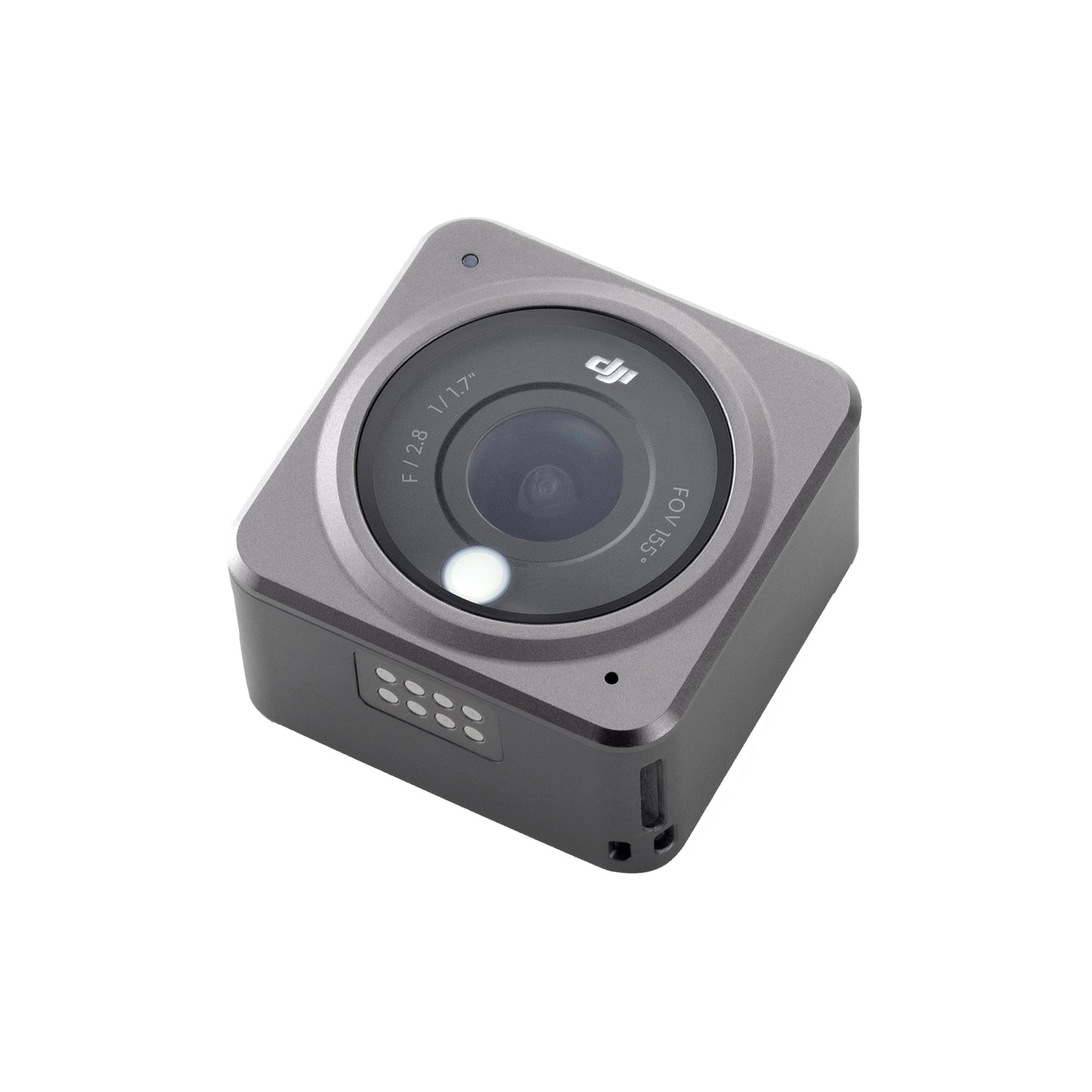
DJI Action 2 Power Combo 4K Recording Waterproof - Black
Out of stock
Couldn't load pickup availability
Share
DJI Action 2 Power Combo 4K Recording Waterproof - Black
- Make a Splash - DJI Action 2 is robust and waterproof right out of the box, so that you can capture it all on your aquatic adventures. The camera unit can be used at depths of up to 10 meters and at 60 meters when paired with the Waterproof Case.
- Upgraded Stabilization - From go-karting to dirt biking, DJI's latest built-in stabilization algorithm detects and corrects camera shake and rotation in real-time.
- Snap Into Your Environment - Action 2's innovative magnetic design allows you to effortlessly switch out accessories as you capture life on the go. Snap on any of Action 2's diverse accessories and discover creative ways to film your adventure.
- Action on the Go - The ultra-compact DJI Action 2 takes up next to no room in your travel bag. With the Magnetic Lanyard and Magnetic Headband, you can effortlessly wear the lightweight camera on your head or chest as you capture the world around you.
- Footage That Speaks for Itself - Record stunningly smooth 4K/120fps video with richer details than ever before. Action 2's ultra-wide FOV lets you capture more of your surroundings as you explore.
- Share-Worthy Content in a Tap - The DJI Mimo app uses its AI Editor to automatically select and combine your epic moments with flawless transitions and upbeat music.
155° Super-Wide FOV
Enhance your perspective and gain improved depth of field with the ultra-wide 155° FOV. Action 2’s custom aspheric lens sharpens edges and reduces image distortion.

Remote Control
Extension Rod
Take a group selfie, control Action 2 remotely, and capture stable video, all with the Remote Control Extension Rod. The quick-release grip is easy to hold and integrates an extension rod, tripod, and removable remote control pad.
Macro Lens
Snap on the Macro Lens for creative close-up shots filled with sharper detail. This optical glass lens with a multi-layer coating is ideal for when you want to get up close and personal with your subject.

DJI Mic
DJI's all-new wireless microphone system delivers exceptional sound quality and dual-channel recording at distances of up to 250 m. The system consists of two microphone transmitters, a receiver, and an ultra-portable charging case. Connect with Action 2 and record crystal-clear audio as you vlog, sing a duet, or describe a local delicacy.

Specifications:
-
Sensor
- 1/1.7” CMOS
-
Lens
- FOV: 155°
Aperture: f/2.8
35mm Format Equivalent: 12.7 mm
Focus Range: 0.3 m to ∞
-
ISO Range
- Photo: 100-6400
Video: 100-6400
-
Electronic Shutter Speed
- Photo: 1/8000-30 s
Video: 1/8000 s to the limit of frames per second
-
Max Photo Resolution
- 4000×3000
-
Zoom
- Digital Zoom
Photo: 4x
Video: 2x (> 60fps), 3x (≤ 60fps, HorizonSteady On), 4x (≤ 60fps, HorizonSteady Off)
Slow Motion/Timelapse: Not available
-
Still Photography Modes
- Single: 12 MP
Countdown: Off/0.5/1/2/3/5/10 seconds
-
Stabilization
- EIS: RockSteady 2.0+HorizonSteady
* EIS is not supported in Slow Motion and Timelapse mode. HorizonSteady is only available when the video resolution is 1080p (16:9) or 2.7K (16:9)
-
Max Video Bitrate
- 130 Mbps
-
Supported File Formats
- exFAT
-
Photo Format
- JPEG / RAW
-
Video Formats
- MP4 (H.264 / HEVC)
-
Built-in Storage Capacity
- 32GB
* 22.4GB of available storage. The Camera Unit doesn't have a microSD card slot, but storage capacity can be expanded by inserting a microSD card into the Front Touchscreen Module or Power Module.
-
Audio Output
- 48 KHz; AAC
Tips for protecting your children online
In today's digital age, ensuring your children's safety while they browse the internet is paramount. As they explore the vast online world through smartphones, gaming consoles, laptops, and other devices, it's essential to implement measures to shield them from potentially harmful content and interactions. Here are some tips to help you safeguard your children online:
1. Communication is Key
Open and ongoing communication with your children about online safety is crucial. Discuss the potential dangers they may encounter online, such as pornography, cyberbullying, and violent content. Encourage them to come to you with any concerns or questions they may have.
2. Set Clear Boundaries
Establish clear rules and boundaries regarding internet usage. Define appropriate time limits for browsing and specify which websites and apps are off-limits. Make sure your children understand the consequences of violating these rules. You can also restrict some of these apps or online content utilizing device level parental controls explained below.
3. Utilize Parental Controls
Take advantage of the parental control features available on devices and internet browsers. These controls allow you to block access to specific websites, set age-appropriate content filters, and monitor your children's online activities. Familiarize yourself with the parental control options on smartphones, gaming consoles, and laptops to effectively manage your children's online experiences.
4. Educate Yourself
Stay informed about the latest trends and technologies related to online safety. Familiarize yourself with popular social media platforms, gaming communities, and messaging apps that your children may use, including the functions they provide. This knowledge will help you understand the potential risks and take appropriate action to protect your children.
5. Monitor Their Online Activities
Regularly monitor your children's online activities to ensure they are adhering to the rules and staying safe. Keep an eye on their browsing history, social media interactions, and messaging apps. Be vigilant for any signs of cyberbullying or exposure to inappropriate content.
6. Encourage Safe Online Behavior
Teach your children about the importance of practicing safe online behavior. Remind them never to share personal information, such as their full name, address, or phone number, with strangers online. Encourage them to think critically about the content they encounter and to report anything that makes them feel uncomfortable or unsafe.
7. Lead by Example
Be a positive role model for your children by demonstrating responsible and respectful online behavior yourself. Show them how to navigate the internet safely and responsibly, and emphasize the importance of treating others with kindness and empathy online.
8. Reporting abuse, making complaints and finding more information
For additional resources and guidance on online safety, visit the Australian e-Safety Commissioner's website at www.esafety.gov.au. Here, you'll find a wealth of information, including tips for parents, educational resources for children, and tools for reporting online abuse and harassment.
You can also report abuse through the website’s online form.
By following these tips and utilizing available resources, you can help keep your children safe from pornography, cyberbullying, violent content, and other unsafe material while they navigate the internet. Remember, proactive measures and open communication are key to fostering a safe and positive online environment for your family.