After several months of use, I can confidently say this device has become a permanent fixture on my desk—and not just because I’m too busy to unplug it. The voice dictation works impressively well, saving both time and keyboard wear, while the video quality is sharp enough to make even Monday morning Zoom calls look respectable.
Whether you’re conferencing or simply attempting to look professional from your home office, the performance is consistently reliable. As someone with over 25–30 years in the IT industry, I don’t hand out praise lightly—but in this case, it’s well deserved.
In short, this is an excellent choice for everyday office use. Logitech continues its long-standing tradition of delivering quality products—thankfully, without requiring an IT support ticket to get started.
If only every piece of tech behaved this well, IT departments everywhere could finally take a proper coffee break.
Fujifilm
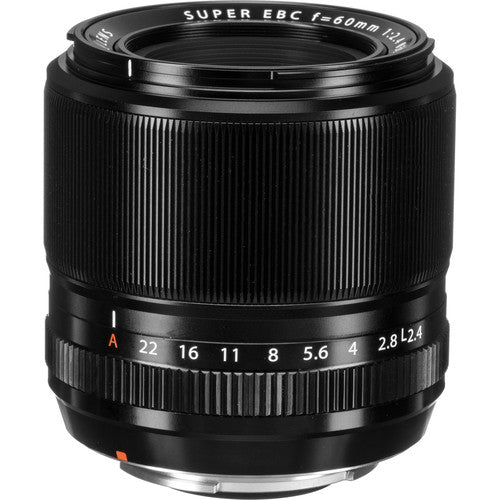
Fujifilm XF60mm F2.4 R Macro Lens
Out of stock
Couldn't load pickup availability
Share
Fujifilm XF60mm F2.4 R Macro Lens
- A portrait-length prime lens is designed for APS-C-format FUJIFILM X-mount mirrorless cameras and provides a 91mm equivalent focal length.
- Bright f/2.4 maximum aperture balances a compact design with lens speed for working in difficult lighting conditions and controlling depth of field.
- Ideal for macro shooting, this lens offers half of life-size 1:2 maximum magnification along with a minimum focusing distance of 10.5" to suit working with close-up subjects.
- One aspherical element limits distortion and spherical aberration in order to realize greater sharpness and accurate rendering.
- One extra-low dispersion element greatly reduces color fringing and chromatic aberrations in order to produce greater clarity and color accuracy.
- Super EBC coating has been applied to individual elements to reduce lens flare and ghosting for improved contrast and color fidelity when working in strong lighting conditions.
- The rounded nine-blade diaphragm contributes to a pleasing bokeh quality.
For a clear capture of the close-up world
Designed for use on the APS-C format Fuji X-series cameras, the Fujifilm 60mm f2.4 macro lens possesses the perfect focal length for close-up shooting, roughly a 91mm equivalent in 35mm terms. This telephoto focal length and the closest focus of 26.7cm find this lens well-poised for tackling bugs, flowers and other common Macro photography subject matters, as well as other things you may turn your lens on such as human subjects.
For pinpointing your preferred focal point and rendering the remainder of your image into a non-distracting blur, this lens features a bright f2.4 maximum aperture. This selective focus technique is easy to master with the Fujifilm 60mm lens and will have you competing with more experienced macro shooters in your photography club in no time.
Another benefit of this large aperture is the handheld shooting ability that it brings to the lens. In tricky situations, such as photographing a small insect in the corner of your garden, you can feel confident to attempt the shot without a tripod, as the lens allows you to shoot at a faster shutter speed, consequently reducing the risk of camera shake.

Other Key Features
- Weighs just 215 grams
- Aperture range f2.4-22 (adjustable in 1/3 stop increments)
- The excellent optical construction of 10 elements in 8 groups - contains 1 ED and 1 Aspherical lens
Medium Telephoto Macro Lens
This medium telephoto lens produces outstanding macro images. The use of one aspherical and one extra-low dispersion element effectively controls various aberrations, such as field curvature and chromatic aberration, plus all the lens groups are shifted together during focusing to achieve the highest level of sharpness in the X Series lineup. As well as being perfect for close-ups, it can also be used for many other medium telephoto applications, with the F2.4 maximum aperture delivering smooth bokeh.
- This is a mid-telephoto lens with a bright aperture of F2.4 despite its compact size.
- It uses a glass molded aspheric lens at the 7th element to prevent field curvature
- and places an ED (extra-low dispersion) glass lens at the 6th element to contain chromatic aberration.
- The lens is ideal for portraiture because of its beautiful blur and high-definition description.
- At the minimum working distance of 26.7cm, the lens delivers a maximum magnification of 0.5x for macro photography.

Specification
| Focal Length | 60mm (35mm Equivalent Focal Length: 91mm) |
| Maximum Aperture | f/2.4 |
| Minimum Aperture | f/22 |
| Lens Mount | FUJIFILM X |
| Lens Format Coverage | APS-C |
| Angle of View | 26.6° |
| Minimum Focus Distance | 10.51" / 26.7 cm |
| Maximum Magnification | 0.5x |
| Macro Reproduction Ratio | 1:2 |
| Optical Design | 10 Elements in 8 Groups |
| Diaphragm Blades | 9, Rounded |
| Focus Type | Autofocus |
| Image Stabilization | No |
| Filter Size | 39 mm (Front) |
| Dimensions (ø x L) | 2.52 x 2.79" / 64.1 x 70.9 mm |
| Length at Maximum Extension | 2.51" / 63.68 mm |
| Weight | 7.58 oz / 215 g |
Packaging Info
| Package Weight | 1.47 lb |
| Box Dimensions (LxWxH) | 7.5 x 4.8 x 4.25" |
Tips for protecting your children online
In today's digital age, ensuring your children's safety while they browse the internet is paramount. As they explore the vast online world through smartphones, gaming consoles, laptops, and other devices, it's essential to implement measures to shield them from potentially harmful content and interactions. Here are some tips to help you safeguard your children online:
1. Communication is Key
Open and ongoing communication with your children about online safety is crucial. Discuss the potential dangers they may encounter online, such as pornography, cyberbullying, and violent content. Encourage them to come to you with any concerns or questions they may have.
2. Set Clear Boundaries
Establish clear rules and boundaries regarding internet usage. Define appropriate time limits for browsing and specify which websites and apps are off-limits. Make sure your children understand the consequences of violating these rules. You can also restrict some of these apps or online content utilizing device level parental controls explained below.
3. Utilize Parental Controls
Take advantage of the parental control features available on devices and internet browsers. These controls allow you to block access to specific websites, set age-appropriate content filters, and monitor your children's online activities. Familiarize yourself with the parental control options on smartphones, gaming consoles, and laptops to effectively manage your children's online experiences.
4. Educate Yourself
Stay informed about the latest trends and technologies related to online safety. Familiarize yourself with popular social media platforms, gaming communities, and messaging apps that your children may use, including the functions they provide. This knowledge will help you understand the potential risks and take appropriate action to protect your children.
5. Monitor Their Online Activities
Regularly monitor your children's online activities to ensure they are adhering to the rules and staying safe. Keep an eye on their browsing history, social media interactions, and messaging apps. Be vigilant for any signs of cyberbullying or exposure to inappropriate content.
6. Encourage Safe Online Behavior
Teach your children about the importance of practicing safe online behavior. Remind them never to share personal information, such as their full name, address, or phone number, with strangers online. Encourage them to think critically about the content they encounter and to report anything that makes them feel uncomfortable or unsafe.
7. Lead by Example
Be a positive role model for your children by demonstrating responsible and respectful online behavior yourself. Show them how to navigate the internet safely and responsibly, and emphasize the importance of treating others with kindness and empathy online.
8. Reporting abuse, making complaints and finding more information
For additional resources and guidance on online safety, visit the Australian e-Safety Commissioner's website at www.esafety.gov.au. Here, you'll find a wealth of information, including tips for parents, educational resources for children, and tools for reporting online abuse and harassment.
You can also report abuse through the website’s online form.
By following these tips and utilizing available resources, you can help keep your children safe from pornography, cyberbullying, violent content, and other unsafe material while they navigate the internet. Remember, proactive measures and open communication are key to fostering a safe and positive online environment for your family.