SAMYANG
Samyang AF 35mm f/1.4 FE II Lens for Sony E-Mount
Out of stock
Couldn't load pickup availability
Share
Samyang AF 35mm f/1.4 FE II Lens for Sony E-Mount
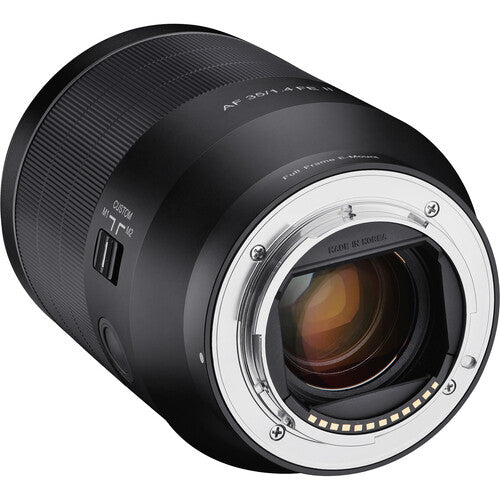
The Samyang 35mm f/1.4 AF II is a versatile, well-rounded, wide-angle lens for Sony E-mount cameras. It excels in everything from street photography to landscape and video work, thanks to its suite of cutting-edge features, full-frame coverage, and customizable controls. Its updated AF system features an internal focusing design that maintains the overall length of the lens during use and prevents the filter ring and lens barrel from rotating during focusing. This benefits working with circular polarizers and graduated ND filters.
A linear stepping motor is used for silent and precise operation. The built-in switch allows you to use the focus ring to control the aperture and features a full-time focus override. Making deliberate use of their ultra multicoating technology, Samyang has equipped this lens with two high refractive index elements and two aspherical elements to help control spherical aberrations and distortions for improved sharpness, resolution, and clarity.
The physical design features weather-sealed construction to guard against dust and moisture. A rounded nine-blade diaphragm contributes to a pleasing bokeh quality. The AF 35mm f/1.4 FE MK2 has been developed and enhanced, taking into consideration not only the design but also the user's shooting environment. It has a stylish silver ring, matte finish, and weather-sealing (4 spots) which also protects the lens from light rain, snow, and dust.
Extremely Narrow Depth of Field with Refined Beautiful Bokeh

The minimum focal distance is just 29cm (0.95ft), making the lens even more versatile

The AF 35mm F1.4 FE II has been developed and enhanced, taking into consideration not only the design but also the user's shooting environment

Specifications:
| Focal Length: | 35mm |
| Maximum Aperture: | f/1.4 |
| Minimum Aperture: | f/16 |
| Lens Mount: | Sony E |
| Lens Format Coverage: | Full-Frame |
| Angle of View: | 65.5° |
| Minimum Focus Distance: | 11.42" / 0.29 m |
| Maximum Magnification: | 0.18x |
| Optical Design: | 11 Elements in 9 Groups |
| Diaphragm Blades: | 9 |
| Focus Type: | Autofocus |
| Image Stabilization: | No |
| Filter Size: | 67 mm (Front) |
| Dimensions (ø x L): | 3 x 4.5" / 75 x 115 mm |
| Length at Maximum Extension: | 4.5" / 115 mm |
| Weight: | 23.2 oz / 659 g |
| Package Weight: | 2.005 lb |
| Box Dimensions (LxWxH): | 7.2 x 5.5 x 5.2" |
Tips for protecting your children online
In today's digital age, ensuring your children's safety while they browse the internet is paramount. As they explore the vast online world through smartphones, gaming consoles, laptops, and other devices, it's essential to implement measures to shield them from potentially harmful content and interactions. Here are some tips to help you safeguard your children online:
1. Communication is Key
Open and ongoing communication with your children about online safety is crucial. Discuss the potential dangers they may encounter online, such as pornography, cyberbullying, and violent content. Encourage them to come to you with any concerns or questions they may have.
2. Set Clear Boundaries
Establish clear rules and boundaries regarding internet usage. Define appropriate time limits for browsing and specify which websites and apps are off-limits. Make sure your children understand the consequences of violating these rules. You can also restrict some of these apps or online content utilizing device level parental controls explained below.
3. Utilize Parental Controls
Take advantage of the parental control features available on devices and internet browsers. These controls allow you to block access to specific websites, set age-appropriate content filters, and monitor your children's online activities. Familiarize yourself with the parental control options on smartphones, gaming consoles, and laptops to effectively manage your children's online experiences.
4. Educate Yourself
Stay informed about the latest trends and technologies related to online safety. Familiarize yourself with popular social media platforms, gaming communities, and messaging apps that your children may use, including the functions they provide. This knowledge will help you understand the potential risks and take appropriate action to protect your children.
5. Monitor Their Online Activities
Regularly monitor your children's online activities to ensure they are adhering to the rules and staying safe. Keep an eye on their browsing history, social media interactions, and messaging apps. Be vigilant for any signs of cyberbullying or exposure to inappropriate content.
6. Encourage Safe Online Behavior
Teach your children about the importance of practicing safe online behavior. Remind them never to share personal information, such as their full name, address, or phone number, with strangers online. Encourage them to think critically about the content they encounter and to report anything that makes them feel uncomfortable or unsafe.
7. Lead by Example
Be a positive role model for your children by demonstrating responsible and respectful online behavior yourself. Show them how to navigate the internet safely and responsibly, and emphasize the importance of treating others with kindness and empathy online.
8. Reporting abuse, making complaints and finding more information
For additional resources and guidance on online safety, visit the Australian e-Safety Commissioner's website at www.esafety.gov.au. Here, you'll find a wealth of information, including tips for parents, educational resources for children, and tools for reporting online abuse and harassment.
You can also report abuse through the website’s online form.
By following these tips and utilizing available resources, you can help keep your children safe from pornography, cyberbullying, violent content, and other unsafe material while they navigate the internet. Remember, proactive measures and open communication are key to fostering a safe and positive online environment for your family.