Tascam
Tascam DR-10L Micro Portable Audio Recorder with Lavalier Microphone
Out of stock
Couldn't load pickup availability
Share
Tascam DR-10L Micro Portable Audio Recorder with Lavalier Microphone
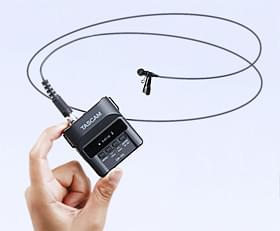
The DR-10L is an ultra-compact digital recorder/lavalier microphone combination. Designed for both the creative filmmaker and the busy videographer, it is a powerful problem solver providing professional sonics and high convenience. For location recording, a DR-10L can be mounted to each on-camera actor, making booms, wires, or expensive (and unpredictable)wireless systems unnecessary. The DR-10L is also an inspiring tool for the experimental audio designer thanks to its portability, high quality, and tiny, professionally spec microphone.

For added flexibility, the included wired lavalier microphone is affixed via a screw connector compatible with most Sennheiser lavalier microphones and other mics with the same connector.
Ultra-Compact Recorder/Mic Combo

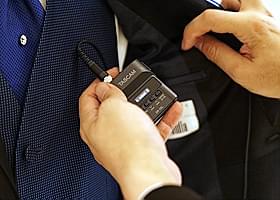
The DR-10L is small, easy to conceal, and weighs only 63 grams including the battery. Perfect for film shoots, interviews, press conferences, or stage performances, the DR-10L can easily be hidden away so that nothing comes between you and the perfect shot (with perfect audio!).
A durable clip is also included allowing the unit to be attached to a belt and hidden under a jacket, for example.
Simple and Easy Setup

The dedicated lavalier microphone included with the DR-10L is a perfect match with the recorder. It captures a wide range of sound levels with a sensitivity of –42 dB/Pa, and 115 dB SPL maximum input sound pressure. This means it picks up quiet speakers just as well as loud ones.
A few settings on the simple panel are needed to start recording, and the screw lock ensures that the connection is always secure.
Long Time Operation With a Single AAA Battery

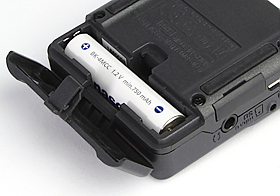
One easily obtained Alkaline AAA battery powers the DR-10L for up to 10 hours* continuously. This means all-day-long performance with minimal concern for changing the battery. Disposable lithium or rechargeable NiMH batteries can also be used.
* Up to 15 hours with a lithium battery. Battery life varies depending on battery type. When using the DR-10L with headphones connected, operation time decrease
Linear PCM Recording For High-Quality Audio

The DR-10L is designed to capture high-quality audio at 44.1 kHz or 48 kHz and 16/24 bit. It is perfect for television, film, and stage performances, as well as lectures and other professional recording applications. The unit records in WAV/BWF recording format, selectable from mono or poly (stereo file with the same data on both left and right channels). The firmware V2.0 and later update also offers MP3 recording at both 128 kbit/s and 192 kbit/s.
Also, the names of the files created can be composed of a user-defined series of characters or the date.
Headphones Output For Input Monitoring and Playback

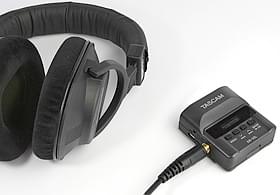
Even though the DR-10L is really small, it has a headphones output that allows you to check recorded data right away, and monitor the input during recording. Although you can connect stereo headphones, you will hear the same signal on both sides as the DR-10L records in mono.
Note: When operated with headphones, battery life decreases significantly.
Specifications
Portable Recorder
| Number of Tracks | 1 |
| Maximum Sampling Rate | 48 kHz / 24-Bit |
| Microphone | Interchangeable Omnidirectional Condenser Lavalier |
| Built-In Speaker | No |
| Display | OLED |
| Memory Card Support | microSD (64 MB to 2 GB) microSDHC (4 to 32 GB) |
| Internal Storage | None |
Recording
| Audio File Formats | BWF, MP3, WAV |
| Sample Rates |
WAV: 44.1 / 48 kHz |
| Bit Depth | 16 / 24-Bit |
| Bit Rates | 128 to 192 kb/s (Record) 32 to 320 kb/s (Playback) |
| Signal Processing & FX | Auto Gain, Limiter, Low-Cut Filter |
| Timecode Support | No |
| Recording Time |
WAV 48 kHz/24-Bit: 2 Hrs 4 Mins per GB (Mono) |
Connectivity
| Analog I/O |
1 x 1/8" / 3.5 mm TRS Female Unbalanced Mic Input (Lockable) 1 x 1/8" / 3.5 mm TRS Female Unbalanced Headphone Output |
| Digital I/O | None |
| Phantom Power | None |
| Plug-In Power | Yes, 2 V |
| Host Connection | 1 x Micro-USB (2.0) |
Performance
| Frequency Response | 20 Hz to 22 kHz +1/-2 dB |
| Gain/Trim Range |
Mic Inputs: +14 to +38 dB |
| Max Input Level |
Inputs: -15 dBu (Low Gain) -55 dBu (High Gain) |
| Impedance |
Mic Inputs: 33 Kilohms (Plug-In Power Off) 2 Kilohms (Plug-In Power On) |
| SNR |
Headphone Outputs: ≥88 dB |
| Microphone Sensitivity | -42 dBV/Pa |
| Microphone Max SPL | 115 dB SPL |
Power
| Power Options | Batteries or USB Bus Power |
| Battery Type | 1 x AAA (Not Included) |
| Approximate Battery Life |
WAV 48 kHz/24-Bit: 10 Hours (Alkaline, Mono, without Headphones) 9.5 Hours (Alkaline, Mono, Plug-In Power On, without Headphones) 8 Hours (NiMH, Mono, without Headphones) 7.5 Hours (NiMH, Mono, Plug-In Power On, without Headphones) 15.5 Hours (Lithium, Mono, without Headphones) 14.5 Hours (Lithium, Mono, Plug-In Power On, without Headphones) |
Physical
| Operating Temperature | 32 to 104°F / 0 to 40°C |
| Dimensions | 2 x 2.2 x 1" / 52 x 55.6 x 24.4 mm |
| Weight | 2.2 oz / 63 g (with Batteries) 1.8 oz / 51 g (without Batteries) |
Packaging Info
| Package Weight | 0.45 lb |
| Box Dimensions (LxWxH) | 5.8 x 4.6 x 2.2" |
Tips for protecting your children online
In today's digital age, ensuring your children's safety while they browse the internet is paramount. As they explore the vast online world through smartphones, gaming consoles, laptops, and other devices, it's essential to implement measures to shield them from potentially harmful content and interactions. Here are some tips to help you safeguard your children online:
1. Communication is Key
Open and ongoing communication with your children about online safety is crucial. Discuss the potential dangers they may encounter online, such as pornography, cyberbullying, and violent content. Encourage them to come to you with any concerns or questions they may have.
2. Set Clear Boundaries
Establish clear rules and boundaries regarding internet usage. Define appropriate time limits for browsing and specify which websites and apps are off-limits. Make sure your children understand the consequences of violating these rules. You can also restrict some of these apps or online content utilizing device level parental controls explained below.
3. Utilize Parental Controls
Take advantage of the parental control features available on devices and internet browsers. These controls allow you to block access to specific websites, set age-appropriate content filters, and monitor your children's online activities. Familiarize yourself with the parental control options on smartphones, gaming consoles, and laptops to effectively manage your children's online experiences.
4. Educate Yourself
Stay informed about the latest trends and technologies related to online safety. Familiarize yourself with popular social media platforms, gaming communities, and messaging apps that your children may use, including the functions they provide. This knowledge will help you understand the potential risks and take appropriate action to protect your children.
5. Monitor Their Online Activities
Regularly monitor your children's online activities to ensure they are adhering to the rules and staying safe. Keep an eye on their browsing history, social media interactions, and messaging apps. Be vigilant for any signs of cyberbullying or exposure to inappropriate content.
6. Encourage Safe Online Behavior
Teach your children about the importance of practicing safe online behavior. Remind them never to share personal information, such as their full name, address, or phone number, with strangers online. Encourage them to think critically about the content they encounter and to report anything that makes them feel uncomfortable or unsafe.
7. Lead by Example
Be a positive role model for your children by demonstrating responsible and respectful online behavior yourself. Show them how to navigate the internet safely and responsibly, and emphasize the importance of treating others with kindness and empathy online.
8. Reporting abuse, making complaints and finding more information
For additional resources and guidance on online safety, visit the Australian e-Safety Commissioner's website at www.esafety.gov.au. Here, you'll find a wealth of information, including tips for parents, educational resources for children, and tools for reporting online abuse and harassment.
You can also report abuse through the website’s online form.
By following these tips and utilizing available resources, you can help keep your children safe from pornography, cyberbullying, violent content, and other unsafe material while they navigate the internet. Remember, proactive measures and open communication are key to fostering a safe and positive online environment for your family.