After several months of use, I can confidently say this device has become a permanent fixture on my desk—and not just because I’m too busy to unplug it. The voice dictation works impressively well, saving both time and keyboard wear, while the video quality is sharp enough to make even Monday morning Zoom calls look respectable.
Whether you’re conferencing or simply attempting to look professional from your home office, the performance is consistently reliable. As someone with over 25–30 years in the IT industry, I don’t hand out praise lightly—but in this case, it’s well deserved.
In short, this is an excellent choice for everyday office use. Logitech continues its long-standing tradition of delivering quality products—thankfully, without requiring an IT support ticket to get started.
If only every piece of tech behaved this well, IT departments everywhere could finally take a proper coffee break.
High Conversion Efficiency
The 120W solar panel portable charger is made for simultaneous charging with its 4 port smart charging technology. Equipped with 1 × DC, 1 × USB C 3.0 18W, 1 × USB C PD60W, 1 × USB A you can charge your electronics products and most portable power stations on the market.
Waterproof And Reliable
Waterproof, corrosion resistant and high temperature resistant, this portable solar charger is ideal for outdoor activities such as camping, hiking, picnics and unexpected power outages.
Portable
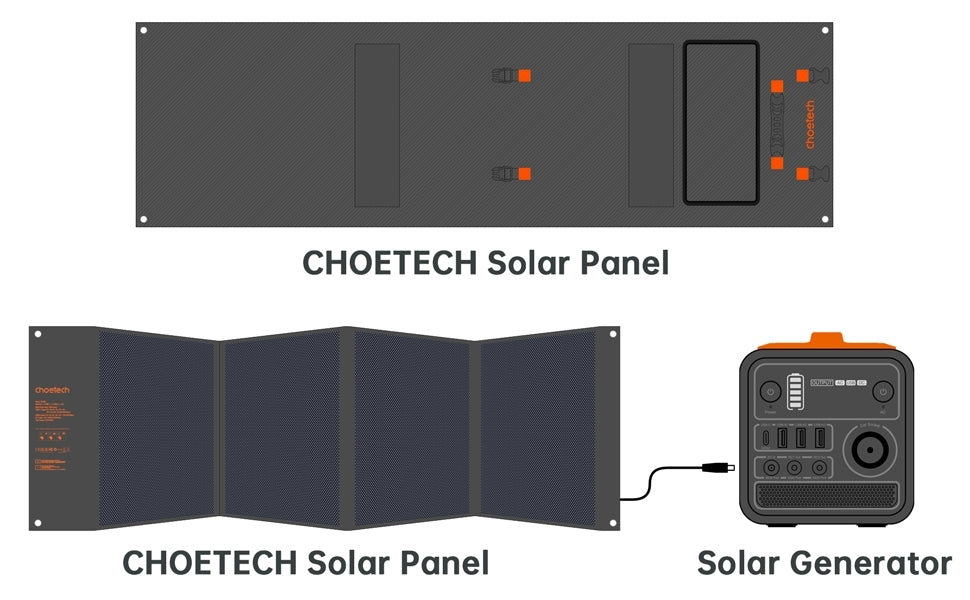
This solar panel usb charger aims to meet outdoor activities needs, so it can be folded easily. When unfolded (177x53cm), it can hang on your RV, van, or just spread out on the beach to provide you with an instant charge straight from the sun. Convenient to carry it wherever you go.
Exclusive Smart IC Technology
Built-in smart IC chip in the USB port can protect your devices from overcharging and overloading without using a charge controller and will recognize the type of device that you are charging in order to provide the optimal charging speed.
Designed For Solar Generators
Our 120W Solar Charger includes 10 DC connectors, which is compatible with most solar generators on the market. Choetech Mighty+ 300W Solar generator, 8mm DC Adapter for Jackery Explorer 240/160/500/1000 Power station/Goal Zero Yeti 150/400 and BALDR 330W Power Station, 3.5 × 1.35mm DC Adapter for Suaoki S270/ENKEEO S155/Paxcess 100W/Aiper 150W portable generator, 5.5 × 2.1mm DC Adapter for Rockpals 250W/350W/500W power station/PROMAX 300W/FlashFish 200W portable generator. C4 connector cable for other compatible portable power stations.
- Powering USB-A & USB-C Devices
- 4 DC/USB/USB-C outputs to power up to 4 of your outdoor devices
- DC Output:12-18V/6.66A(120W Max)
- Type C Output 1(QC3.0 18W Max) 5V-3A,9V-2A,12V-1.5A
- Type C Output 2(PD3.0 60W Max) 5V-3A,9V-3A,12V-3A,15V-3A,20V-3A
- USB-A Output(12W Max) 5V-2.4A; Apple-2.4A
Technical Specifications
- Solar Panel Wattage: 120 Watts
- Solar Panel Type: Mono-crystalline
- Cell Efficiency: 23%
- DC Charging Output: 12-18V/6.66A(120W Max)
- Type C 1 (QC3.0 18W Max):5V-3A,9V-2A,12V-1.5A
- Type C 2 (PD3.0 60W Max):5V-3A,9V-3A,12V-3A,15V-3A,20V-3A
- USB A(12W Max):5V-2.4A
- Operating Temperature Range: -10°C~65°C
Note
- 1. The junction box is not waterproof so please keep it dry.
- 2. Please check the model, size, voltage and power of your original adapter to ensure compatibility before using.
- 3. Although polyester canvas provides waterproof protection, we recommend minimizing contact with water to protect the internal electronic components of the product.
- 4. When the sun is not enough and multiple output ports are used at the same time, the solar panel will automatically distribute the current and give priority to charging some of the devices.
- 5. This item is a solar panel, please put it under direct sunlight, cloudy weather may affect its efficiency and power output.