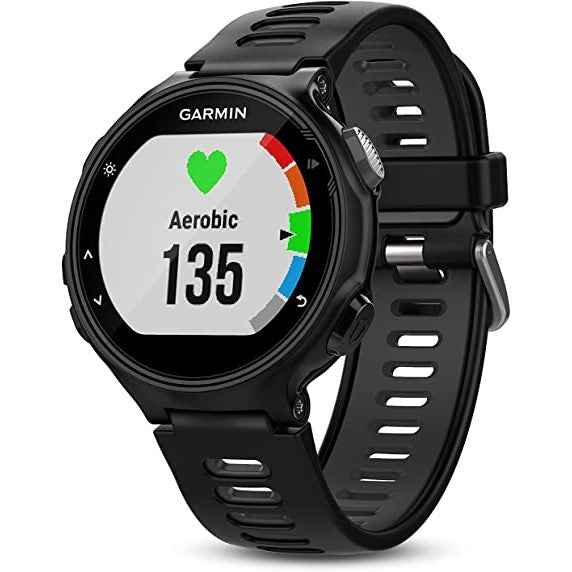
Garmin Forerunner 735XT Music Smartwatch - Black
GPS Running Watch with Multisport Features and Wrist-based Heart Rate
- Measures heart rate at the wrist so you can run freer on race day
- Provides advanced dynamics for running, cycling, and swimming, including ground contact time balance, stride length, vertical ratio, and more
- Offers VO2 max estimate, lactate threshold, race predictor, and recovery advisor
- Connected features: smart notifications, automatic uploads to Garmin Connect, live tracking, and more
- Customize with free watch faces, apps, and more from our Connect IQ store
You Do It All, Now Your Watch Can Too
Be a better athlete today than you were yesterday with Forerunner 735XT. This GPS running watch with multisport features is for athletes who want dialed-in data for training and a lighter load on race day. A smaller form factor and comfortable band make 735XT the ideal watch to get you from workout through workday. Connected features4 like automatic uploads to Garmin Connect, our free online fitness community, let you share your stats and triumphs through social media.
Run, Sprint, Swim, Bike, Tri
Your routine is anything but routine. Forerunner 735XT lets you change things up with ease thanks to built-in activity profiles for running (indoor/outdoor), cycling (indoor/outdoor), swimming (pool/open water), cross-country skiing, paddle sports, trail running, hiking, and strength training.
For brick workouts and du/triathlon races, the auto multisport feature lets you switch sports with just one button press. 735XT is compatible with advanced workouts for running, cycling — and even pool swimming. Create your own custom workouts and download them for free from Garmin Connect. Then review your past efforts on the app or share them with family and friends for added motivation.
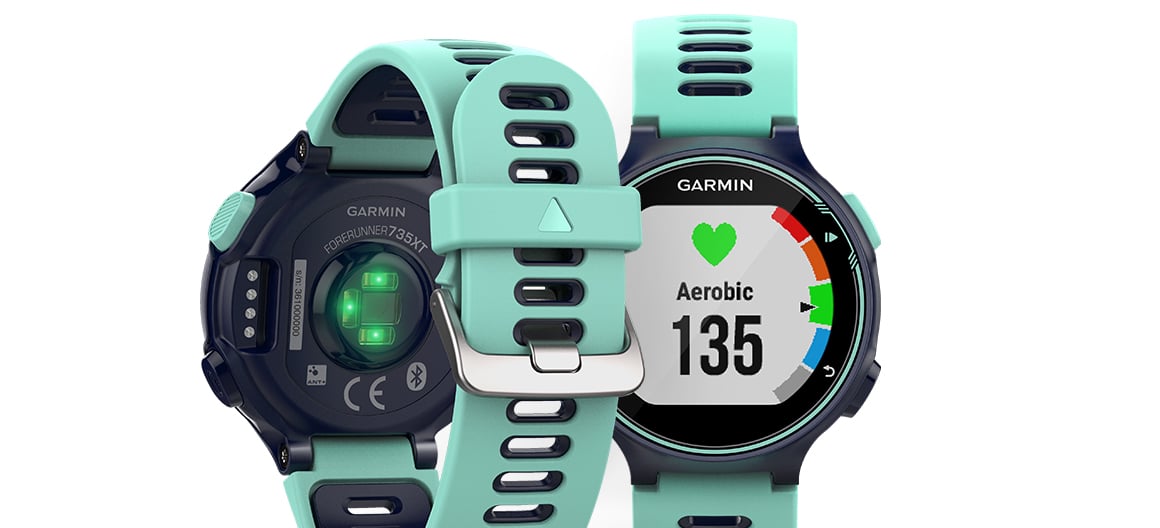
Wrist-based Heart Rate Monitors Your Ticker
Forerunner 735XT has built-in Elevate heart rate technology to measure heart rate at the wrist. That means you can run freer when it’s time to toe the line. No need to wear a chest strap to see your heart rate zone and beats per minute in real-time displayed on a colorful gauge.
class="row top-m bottom-m"> class="span13">
Train Your Heart Out
Wrist-based heart rate may suit your needs to a “T” on race day, but when it comes to training and recovery, you might want more dialed-in data. With Forerunner 735XT, you have options. Here are some of the advanced metrics you’ll gain with the addition of a heart rate strap:
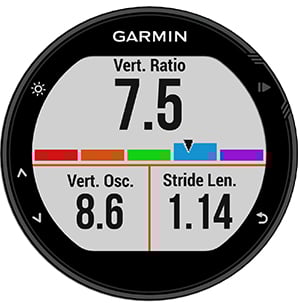
- Running dynamics such as ground contact time balance, stride length, vertical ratio, and more
- VO2 max estimate, lactate threshold, race predictor, and recovery advisor
- Underwater heart rate for swimming
Raise the Bar for Every Ride and Run
Forerunner 735XT is the first running watch that's compatible with Strava Live Segments. Your starred Strava running and cycling segments automatically sync with the 735XT for live feedback during your activity. Also get alerts for segment starts and finishes, view leaderboard rankings, and see how your current effort compares to your PR. Make every effort a personal challenge with Strava Live Segments.
Connect and Customize
Smart notifications, automatic uploads to Garmin Connect, and live tracking make 735XT the ultimate smartwatch for athletes. Keep your phone tucked away when you’re on a long ride or run, and get all your notifications at your wrist so you can decide to respond or keep moving. Also, with Garmin Connect Mobile’s ability to share your runs and workouts, cheerleading doesn’t just take place at the sidelines anymore. Your friends and family can view and comment, no matter how far away they are. You can even customize your device with free watch faces, apps, and data fields from Connect IQ to really make 735XT your watch.
LiveTrack
LiveTrack lets family and friends track your location in real time while you’re riding, and now it’s even easier to use. When you enable auto-start, you can spend more time focusing on the ride and less on the technology. LiveTrack will automatically detect when you start riding, which means there’s no need to even reach for your phone anymore. Auto-start is also compatible with the new Strava Beacon, which lets Strava Summit subscribers take advantage of the same great feature. It’s never been easier for you and your loved ones to have peace of mind while you ride.
Save Your Sweat Equity
Get more from your miles at Garmin Connect, our free online community where you can save, plan and share activities. Beat yesterday by nailing a new PR — we’ll keep track so you can view your victories all in one spot. Get digital insights tailored to your stats and habits, like cues to move and healthy tips. Connect with other users to challenge and compete. Available on your compatible mobile device.
A Few More Extras
Just like you, Forerunner 735XT goes hard, all day long. This watch becomes your partner in recovery with all-day activity tracking that monitors steps, calories, and sleep. It’s also compatible with our line of Varia cycling awareness devices, including rearview radar, smart bike lights, and Varia Vision in-sight display.
Wear Your Personality on Your Sleeve
Download the free Garmin Face It watch face app to customize your device with any photo from your smartphone. Just download the app, choose an image from your photo library, adjust the style for time and set it as your watch’s face. Whether it’s a scenic view from your last hike or a picture of your new puppy, with Garmin you can add personality to your watch that’s uniquely you.
Specification
General
|
| LENS MATERIAL |
chemically strengthened glass
|
| STRAP MATERIAL |
silicone
|
| PHYSICAL SIZE |
44.5 x 44.5 x 11.9 mm
|
| COLOR DISPLAY |
| DISPLAY SIZE |
1.23" (31.1 mm) diameter |
| DISPLAY RESOLUTION |
215 x 180 pixels |
| DISPLAY TYPE |
sunlight-visible, transflective memory-in-pixel (MIP) |
| WEIGHT |
40.2 g
|
| WATER RATING |
5 ATM |
| BATTERY LIFE |
Smartwatch Mode: Up to 11 days
GPS mode: Up to 14 hours
UltraTrac mode: Up to 24 hours without wrist heart rate |
| MEMORY/HISTORY |
80 hours of activity data |
BRAND NEW
ONE YEAR WARRANTY
STOCK IN AUSTRALIA
AUSTRALIAN SELLER