Garmin Forerunner 935 Smart Watch
Premium GPS Running/Triathlon Watch with Wrist-based Heart Rate
- Offers advanced running and multisport features in a comfortable watch you can wear all day, and it only weighs 49 grams
- Provides elevation changes with a built-in barometer; altimeter and electronic compass to help you keep your bearings
- Evaluates your training status to indicate if you’re undertraining or overdoing it and offer additional performance monitoring features
- Provides advanced dynamics for running, cycling, and swimming, including ground contact time balance, stride length, and more
- Battery life: up to 2 weeks in watch mode, up to 24 hours in GPS mode, up to 50 hours in UltraTrac mode (with wrist-based heart rate), or up to 60 hours in UltraTrac mode (without wrist-based heart rate)

Who cares that Forerunner 935 gives you rich data like running dynamics, wrist-based heart rate, Training status, FTP, and VO2 max? A dedicated athlete likes you who’s ready to beat yesterday. This premium GPS running/triathlon watch helps you fine-tune your training and Recovery to be a better athlete.
Fits Your Wrist and Your Fashion Sense
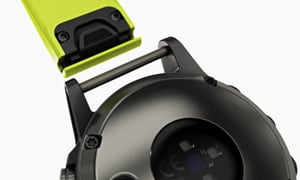
Forerunner 935 GPS running/triathlon watch features a lightweight, comfortable design you’ll be happy to wear all day. The 935 is compatible with our line of easy-to-swap QuickFit Bands With a band to suit every event, you can easily change from sporty silicone to classic leather and even high-end metal.
Monitor Your Performance, Training, and Recovery
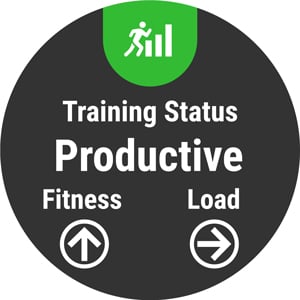
Just how effective is your current training plan? Forerunner 935 will help you monitor your training and recovery so you can better prepare for a race or training cycle. Training status is a new performance monitoring tool that automatically evaluates your recent exercise history and performance indicators to let you know if you’re training productively, peaking, or overreaching. The new anaerobic training effect metric opens a window of insight into a critical dimension of training, telling you how your training is improving your ability to push the limits. You can even view your overall training load, which measures your exercise volume from the last 7 days and compares it to the optimal range for your fitness and recent training history.
Analyze Your Technique
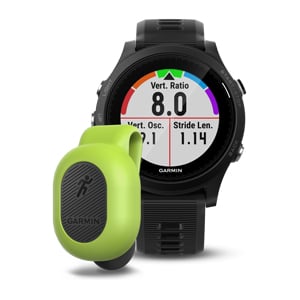
We’re making it easier to get the data you need to improve your form. Let Forerunner 935 measure crucial running metrics that you can use to analyze your performance. Biomechanical measurements such as Cadence, Stride Length, ground contact time and balance, Vertical Oscillation, and Vertical Ratio are the key to understanding your form so you can bring your best on race day. These metrics are available with the addition of a compatible heart rate strap or the compact Running Dynamics Pod, which clips right onto your waistband. Also, take advantage of feature sets to help with cycling and even swim training. In the water, Forerunner 935 will track your distance, pace, stroke count, and more.
Go Longer Between Charges
Outlast your longest workout with a battery you can rely on, even in the middle of an iron-distance triathlon or ultramarathon. Forerunner 935 features up to 24 hours of battery life in GPS mode and up to 50 hours in UltraTrac battery saver mode. When you’re just using it as your day-to-day smartwatch, you’ll get up to 2 weeks from a single charge.
Run, Sprint, Swim, Bike, Tri
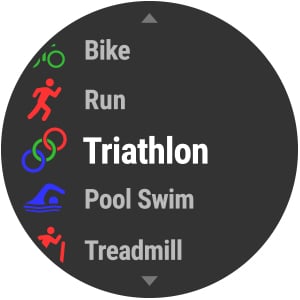
Your routine is anything but routine. Forerunner 935 lets you change things up with ease thanks to built-in activity profiles for running (indoor/outdoor), cycling (indoor/outdoor), swimming (pool/open water), cross-country skiing, paddle sports, trail running, hiking, strength training and many more.
For brick workouts and du/triathlon races, the auto multisport feature lets you switch sports with just one button press. The 935 is compatible with advanced workouts for running, cycling — and even pool swimming. Create your own custom workouts and download them for free from Garmin Connect online fitness community. Then review your past efforts on the app or share them with family and friends for added motivation.
Smarter Connections
Smart notifications delivered right to your wrist are just the beginning. When paired with your compatible smartphone, Forerunner 935 also gives you access to automatic uploads to Garmin Connect, audio prompts, music controls, and more. Let your loved ones follow your runs and rides in real time with LiveTrack — or use GroupTrack, which lets you keep tabs on your riding buddies as you go. For getting your data to and from the cloud, if you like the quick connection Wi-Fi provides, 935 can do that, too.
Follow Your Heart
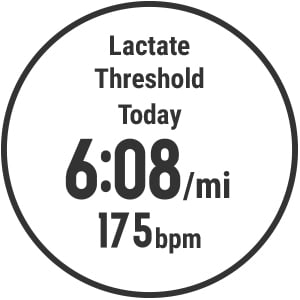
Wrist-based heart rate might be an easy choice when you want to move without restrictions on race day, but Forerunner 935 gives you the option to tap into much more data with the addition of a compatible heart rate strap. A chest strap heart rate monitor (like HRM-Run or HRM-Tri) unlocks advanced features such as lactate threshold and the HRV (heart rate variability) stress test.
On Your Game, Off the Grid
With Forerunner 935, you’re free to go wherever your activities take you — thanks to GPS and GLONASS coverage, which can track better in more challenging environments than GPS alone. Also, a built-in barometer provides you with real-time elevation information. What activities can 935 track? More than you ever thought possible! The triathlon sports are just the beginning because there is also built-in support for hiking, rowing, golf, skiing, stand-up paddle boarding, and lots more.
Women's Health Tracking
Use the Garmin Connect app to track your menstrual cycle or pregnancy. Log symptoms, get exercise and nutrition education, and more. Even get details on your wrist with the Menstrual Cycle Tracking widget and Pregnancy Tracking app.
Specification
General
|
| LENS MATERIAL |
chemically strengthened glass
|
| BEZEL MATERIAL |
fiber-reinforced polymer
|
| CASE MATERIAL |
fiber-reinforced polymer |
| QUICKFIT WATCH BAND COMPATIBLE |
yes (22 mm)
|
| STRAP MATERIAL |
silicone
|
| PHYSICAL SIZE |
47 x 47 x 13.9 mm
|
| COLOR DISPLAY |
| DISPLAY SIZE |
1.2" (30.4 mm) diameter |
| DISPLAY RESOLUTION |
240 x 240 pixels |
| DISPLAY TYPE |
sunlight-visible, transflective memory-in-pixel (MIP) |
| WEIGHT |
49 g
|
| WATER RATING |
5 ATM |
| BATTERY LIFE |
Smartwatch Mode: Up to 2 weeks
GPS/HR mode: Up to 24 hours
UltraTrack mode: Up to 60 hours without wrist heart rate |
| MEMORY/HISTORY |
64 MB |
BRAND NEW
ONE YEAR WARRANTY
STOCK IN AUSTRALIA
AUSTRALIAN SELLER


