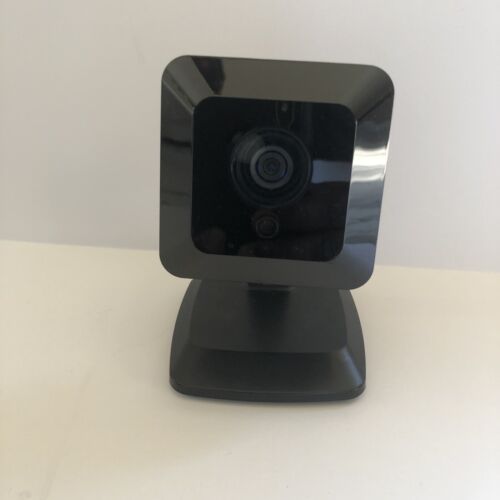
Telstra Smart Home iCamera2 Compact Wireless Weatherproof IP Camera
The iCamera2 has an Integrated Microcomputer and a high-quality CMOS Sensor, enabling it to display high-quality live streaming video over your wired LAN, the Internet, and for the iCamera2, an 802.11N Wireless LAN. Using enhanced H.264 technologies, the iCamera2 is able to stream high-quality video and audio directly to your PC. The high compression capabilities of H.264 reduce network bandwidth requirements to amazingly low levels. Furthermore, with the built-in infrared LEDs, the Wireless IP camera can provide illumination around 5 meters long under low light conditions in a simple, economical manner.
Features
Standalone Design.
The iCamera2 is a standalone system with a built-in CPU and Video encoder. It requires only a power source and a connection to your LAN or Wireless LAN.
Dual Video Support
The iCamera2 can support H.264 and MJEPG video for different image compression.
Stream Live Video to Multiple Users
The video encoder and HTTP server built into the camera generates a ready-to-view video stream. Just connect to the camera using your Web browser to view live video
Suitable for Home, Business, or Public Facilities
Whether for Home, Business, or Public Facility surveillance, or just for entertainment and fun, the iCamera2 has the features you need
Multi-Protocol Support
Supporting TCP/IP networking, HTTP, and other Internet-related protocols, the iCamera2 can be easily integrated into your existing network.
IR LEDs Support
Each iCamera2 has two infrared LEDs. The LEDs can provide illumination around 5 meters long, which can help to output a better video quality while under low-light conditions such as indoors, on cloudy days, or in the morning or evening
Motion Detection
This feature can detect motion in the field of view. The iCamera2 will compare consecutive frames to detect changes caused by the movement of large objects. This function only works indoors due to the sensitivity of the CMOS sensor. When motion is detected or some other action may be triggered
Flexible Scheduling
You can limit access to the video stream to specific times using a flexible scheduling system. The Motion Detection feature can also have its own schedule, so it is active only when required
Syslog Support
If you have a Syslog Server, the iCamera2 can send its log data to your Syslog Server.
Audio Support
You can listen as well as look! Audio is encoded with the video if desired. With a built-in microphone, it is useful for bi-direction voice conversation.
Day/Night Switch
With the day/night switching feature, you are able to view and record better images even in the dark of the night.
Internet Features
User-definable HTTP/HTTPS port number
This allows Internet Gateways to use "port mapping" so the iCamera2 and a Web Server can share the same Internet IP address
NTP (Network-Time-Protocol) Support
NTP allows the iCamera2 to calibrate its internal clock from an Internet Time Server. This ensures that the time stamp on the Video from the iCamera2 will be correct.
Security Features
User Authentication
If desired, access to live video can be restricted to known users. Users will have to enter their username and password before being able to view the video stream.
Password-Protected Configuration
Configuration data can be password protected so that it only can be changed by the iCamera2 Administrator.
Wireless Features
· Supports 11n Wireless Stations
The 802.11n standard provides for backward compatibility with the 802.11b standard, so 802.11n, 802.11b, and 802.11g Wireless stations can be used simultaneously
Wired and Wireless Network Support
The iCamera2 supports either wired or wireless transmission
WEP Support
Full WEP support (64/128 Bit) on the Wireless interface is provided
WPA/WPA2 Support
The WPA Personal/WPA2 Personal standard is also supported, allowing advanced encryption of wireless data.
WPS Support
WPS (Wi-Fi Protected Setup) can simplify the process of connecting any device to the wireless network by using the push button configuration (PBC) on the iCamera2, or entering a PIN code if there's no button.
Package Contents
-
iCamera2 x 1
- Stand x 1
- Y-cable x 1
- DC Cable x 1
- Ethernet Cable x 1
- RJ45 Cap x 1
- Power Adapter x 1
BRAND NEW
ONE YEAR WARRANTY
STOCK IN AUSTRALIA
AUSTRALIAN SELLER