After several months of use, I can confidently say this device has become a permanent fixture on my desk—and not just because I’m too busy to unplug it. The voice dictation works impressively well, saving both time and keyboard wear, while the video quality is sharp enough to make even Monday morning Zoom calls look respectable.
Whether you’re conferencing or simply attempting to look professional from your home office, the performance is consistently reliable. As someone with over 25–30 years in the IT industry, I don’t hand out praise lightly—but in this case, it’s well deserved.
In short, this is an excellent choice for everyday office use. Logitech continues its long-standing tradition of delivering quality products—thankfully, without requiring an IT support ticket to get started.
If only every piece of tech behaved this well, IT departments everywhere could finally take a proper coffee break.
Lenovo
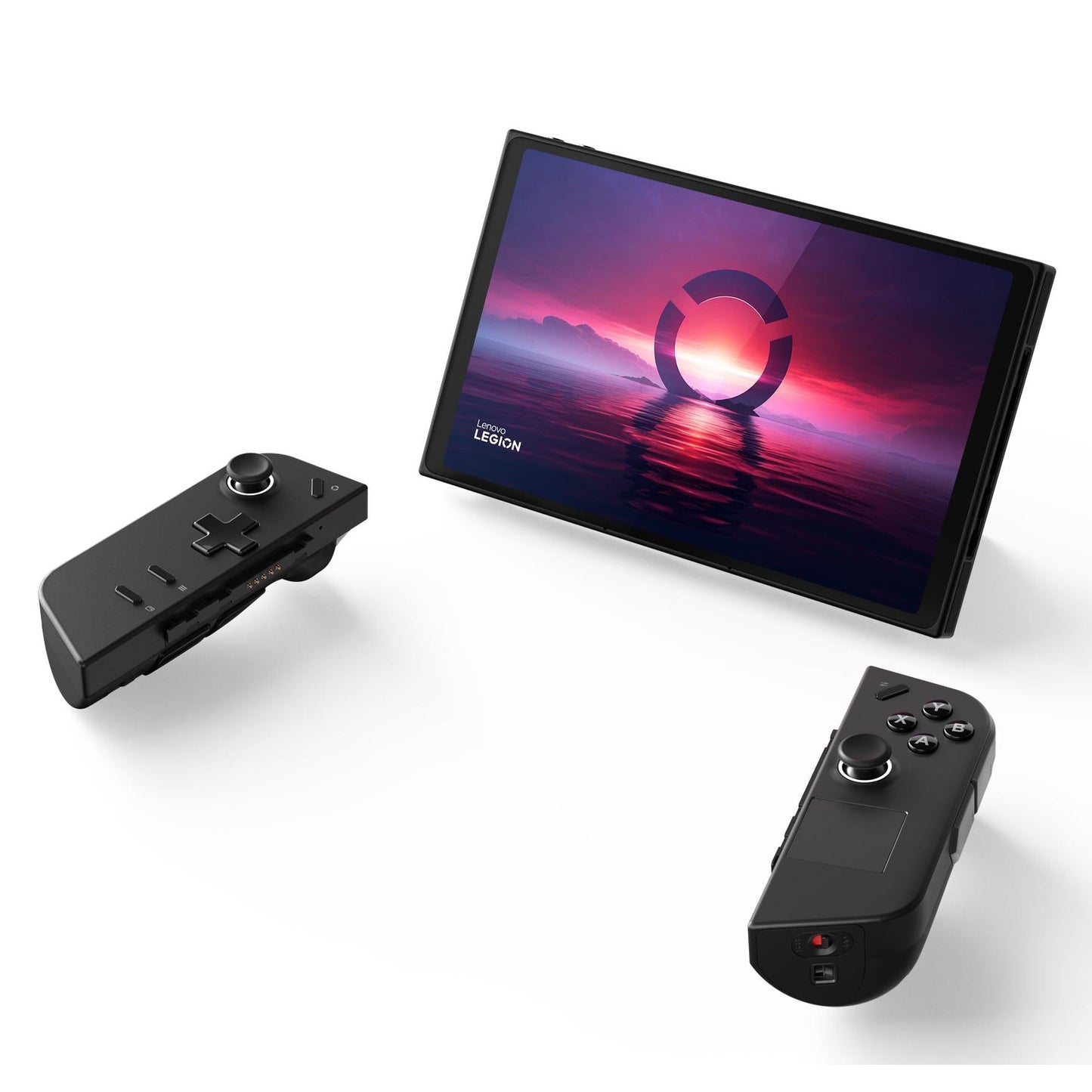
Lenovo Legion Go Z1 Extreme Gaming Console 512GB (International Version)
Out of stock
Couldn't load pickup availability
Share
Lenovo Legion Go Z1 Extreme Gaming Console 512GB (International Version)
- Design & Control: Feel gaming precision with ergonomically designed detachable Legion TrueStrike controllers, while Shadow Black finish offers style & functionality.
- Windows 11: Embrace a new era of handheld gaming. Experience superior performance, streamlined access to games, and an intuitive interface designed for gamers.
- Handheld Mode: In handheld mode, transform your beloved palm device into a portal gaming PC, pushing mobile performance limits and perfect for on-the-go gaming.
- Detachable Mode: After a long day of work or school, imagine unwinding with a relaxing yet immersive gaming session. With Legion Go, it's a breeze! Simply dock your Legion Go to your favorite Legion monitor or TV and settle onto your couch with ergonomically crafted controllers in your hands. Experience gaming in the most comfortable way possible.
Product Description:
Elevate your handheld gaming experience with the Lenovo Legion Go. Immerse yourself in a world of gaming excellence with the 8.8" QHD+ display. Witness breathtaking visuals and crystal-clear graphics thanks to the captivating 500nit brightness and 97% DCI-P3 color gamut. Tailor your experience, adjusting resolutions and refresh rates. Engage effortlessly with the 10-point touch screen.
Experience handheld gaming with console-level performance, a super vivid touchscreen display, and controls that will keep you at the top of the leaderboards. Dominate from anywhere with Lenovo Legion Go! This handheld powerhouse, energized by AMD Ryzen Z1 Series chips, is built for the competitive gamer.
Dominate from anywhere with Lenovo Legion Go! This handheld powerhouse, energized by AMD Ryzen Z1 Series chips, is built for the competitive gamer.
Key Features:
AMD Ryzen Z1 Series Processors
Put unbeatable power in the palm of your hand. They’re purpose-built with voltage curves optimized for entirely new power ranges.
Lenovo Pure Sight Gaming Display
Dive into stunning visuals with the 8.8″ QHD+ display with 500 nits brightness, & a 10-point touchscreen for easier navigation.
Battery
A 49.2 Whr battery offers long gaming sessions. Plus Super Rapid Charge tech brings quick charging, & power bypass mode for longevity.
Legion Space
The ultimate gaming hub provides a gateway to a huge library of games while customizing settings and monitoring real-time system information.
Lean Back & Get to Work
Flip out the kickstand to get optimal viewing angles and game comfortably with detachable joysticks in hand while sitting at a table or lounging in bed.
Hand-Sculpted Controllers for Max Grip & Comfort
The cylindrical controllers fit snuggly into your palm, giving you ample space to hold them without getting caught in awkward finger positions.
Say Hello to Comfortable Gaming
Game with controllers designed for natural handshake posture, easing wrist strain & boosting comfort with a 60-80° angle when resting on a surface.
PC Gaming Power Goes Handheld
The seamlessly integrated memory and storage components deliver optimal gaming performance and lightning-fast load times. With 16GB LPDDR5X RAM operating at 7500MHz, multitask effortlessly and boost productivity. Store all your favorite games, media, and files with the generous PCIe Gen4 Storage. Expand storage easily using the micro-SD card slot, keeping your games intact.
Unleashing Audio Excellence
Immerse in aural perfection with an integrated 2x2W speaker system, a symphony in your palms, crafting crystal-clear soundscapes. Amplify the audio realm with our optional Smart AMP, boosting volume across the audio spectrum and bringing you strikingly vivid, spacious sound.
General Specifications
- Processor: Up to AMD Ryzen Z1 Extreme with RDNA Graphics
- Operating System: Windows 11 Home
- Memory: 16GB 7500Mhz LPDDR5X on board
- Storage: Up to 1TB PCIe 4.0 NVMe M.2 2242
- Battery: 2-cell 49.2WHr
- Super Rapid Charge: Controller battery capacity: 900mah
- Audio: 2 x 2W Speakers
- Dual-array near-field microphone
- Connectivity: Ports / Slots
- USB: USB-C 4.0 (DisplayPort 1.4, Power Delivery 3.0) / MicroSD card reader (supports up to 2TB)
- Bottom: USB-C 4.0 (DisplayPort 1.4, Power Delivery 3.0)
- Wireless: 2x2 Wi-Fi 6E (802.11 ax)
- Bluetooth: Starting at Bluetooth 5.2;
- Display: 8.8″ QHD+ (2560 x 1600) IPS, 500 nits, 16:10 aspect ratio, 144Hz refresh rate, 97% DCI-P3, 83% Active Area Ratio, 10-point touchscreen, Gorilla Glass
- Base Module: 20.1mm x 210mm x 131mm / .79″ x 8.27″ x 5.16″
- Base Module w/ Controllers: 40.7mm x 298.83mm x 131mm / 1.60″ x 11.76″ x 5.16″
- Weight: Base Module: 640g / 1.41lbs
- Base Module w/ Legion TrueStrike Controllers: 854g / 1.88lbs
What's in the Box:
- Legion Go (Base module & Legion True-Strike Controllers)
- Controller base
- AU Adapter
- 65W Power Adapter
- Carrying Case
Tips for protecting your children online
In today's digital age, ensuring your children's safety while they browse the internet is paramount. As they explore the vast online world through smartphones, gaming consoles, laptops, and other devices, it's essential to implement measures to shield them from potentially harmful content and interactions. Here are some tips to help you safeguard your children online:
1. Communication is Key
Open and ongoing communication with your children about online safety is crucial. Discuss the potential dangers they may encounter online, such as pornography, cyberbullying, and violent content. Encourage them to come to you with any concerns or questions they may have.
2. Set Clear Boundaries
Establish clear rules and boundaries regarding internet usage. Define appropriate time limits for browsing and specify which websites and apps are off-limits. Make sure your children understand the consequences of violating these rules. You can also restrict some of these apps or online content utilizing device level parental controls explained below.
3. Utilize Parental Controls
Take advantage of the parental control features available on devices and internet browsers. These controls allow you to block access to specific websites, set age-appropriate content filters, and monitor your children's online activities. Familiarize yourself with the parental control options on smartphones, gaming consoles, and laptops to effectively manage your children's online experiences.
4. Educate Yourself
Stay informed about the latest trends and technologies related to online safety. Familiarize yourself with popular social media platforms, gaming communities, and messaging apps that your children may use, including the functions they provide. This knowledge will help you understand the potential risks and take appropriate action to protect your children.
5. Monitor Their Online Activities
Regularly monitor your children's online activities to ensure they are adhering to the rules and staying safe. Keep an eye on their browsing history, social media interactions, and messaging apps. Be vigilant for any signs of cyberbullying or exposure to inappropriate content.
6. Encourage Safe Online Behavior
Teach your children about the importance of practicing safe online behavior. Remind them never to share personal information, such as their full name, address, or phone number, with strangers online. Encourage them to think critically about the content they encounter and to report anything that makes them feel uncomfortable or unsafe.
7. Lead by Example
Be a positive role model for your children by demonstrating responsible and respectful online behavior yourself. Show them how to navigate the internet safely and responsibly, and emphasize the importance of treating others with kindness and empathy online.
8. Reporting abuse, making complaints and finding more information
For additional resources and guidance on online safety, visit the Australian e-Safety Commissioner's website at www.esafety.gov.au. Here, you'll find a wealth of information, including tips for parents, educational resources for children, and tools for reporting online abuse and harassment.
You can also report abuse through the website’s online form.
By following these tips and utilizing available resources, you can help keep your children safe from pornography, cyberbullying, violent content, and other unsafe material while they navigate the internet. Remember, proactive measures and open communication are key to fostering a safe and positive online environment for your family.

Fantastic product and service, didn’t come with au adapter but customer service we’re right onto it and have sent it out to me. Handheld is the best handheld on the market!! Fast shipping A+++++ all around