Magcubic L018 650 ANSI Smart Projector 4K/1080p, Auto Focus, Portable Android 11
Experience bright, sharp, and ultra-clear viewing with the Magcubic L018 Smart Projector, offering 650 ANSI brightness, 4K & 1080p support, and Auto Focus with Keystone Correction for perfect alignment every time. Powered by Android 11 with built-in apps, Bluetooth 5.2, and dual-band Wi-Fi, this compact portable projector is ideal for home theatre, gaming, office presentations, and outdoor movies. Enjoy smoother streaming, vibrant visuals, and easy setup—all in a lightweight, travel-friendly design.
Description
High-Quality Image with 4K and 1080p Resolution
The Magcubic 650ANSI Smart L018 Projector offers exceptional visual performance with 4K and 1080p resolution support. Whether you’re watching movies, gaming, or giving presentations, this projector delivers sharp, vibrant images with a level of detail that enhances any content. The combination of high resolution and 650 ANSI lumens ensures that images remain clear and bright even in well-lit rooms.

Bright and Vivid Display with 650 ANSI Lumens
Thanks to its 650 ANSI lumens brightness, this projector ensures vivid and clear images, even in ambient light. Whether you’re in a well-lit living room or a conference room, the projector’s brightness allows for an optimal viewing experience without compromising image quality. This makes the L018 projector perfect for both home entertainment and professional use.
Auto Focus & Keystone Correction for Easy Setup
Setting up the Magcubic 650ANSI Smart L018 projector is simple with its auto focus and keystone correction features. These automatic adjustments ensure that your images are perfectly aligned and focused every time. Whether you’re projecting onto a wall or screen at an angle, the projector will adjust its focus and alignment without manual intervention, saving you time and effort.

Android 11 for Seamless Streaming and Apps
With the Android 11 operating system, the Magcubic 650ANSI Smart L018 Projector offers a smart, connected experience. Enjoy popular streaming apps like Netflix, YouTube, and more, directly from the projector. The Android OS gives you access to a wide range of apps, making it easy to enjoy movies, shows, games, and presentations without the need for additional devices.

Bluetooth 5.2 for Enhanced Wireless Connectivity
The Bluetooth 5.2 support ensures that the Magcubic L018 Projector can connect to external audio devices such as Bluetooth speakers, soundbars, or headphones. This enhances the audio experience by allowing you to enjoy high-quality sound without the hassle of tangled wires. Whether you're watching movies or playing games, the audio experience will match the stunning visuals.
Portable Design for On-the-Go Use
With its compact and lightweight design, the Magcubic 650ANSI Smart L018 Projector is built for portability. You can easily take it to any room, or even on trips, without worrying about space or weight. Whether you're at home, at the office, or on the go, the projector can be set up quickly for instant entertainment or presentations.

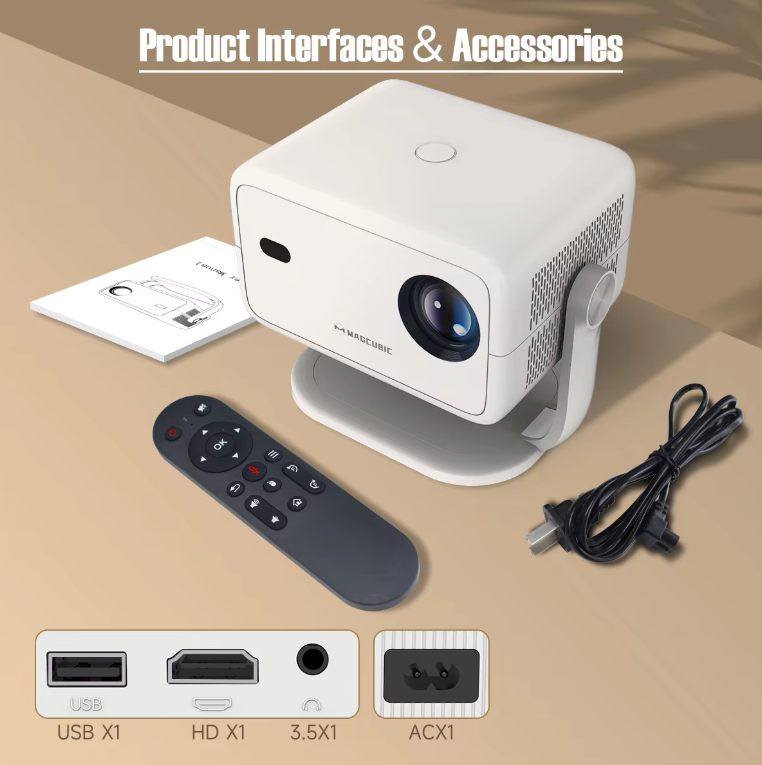
Multiple Connectivity Options for Versatile Use
The Magcubic L018 Projector offers various connectivity options, including HDMI, USB, and Wi-Fi. This ensures that you can connect the projector to your favorite media sources, including laptops, gaming consoles, smartphones, or streaming devices. The Wi-Fi connectivity enables wireless streaming, making it convenient to enjoy your content without cables.

Built-In Sound for an All-In-One Experience
With built-in speakers, the Magcubic 650ANSI Smart L018 Projector ensures that you don't need external audio equipment for a satisfying audio experience. The high-quality sound offers clear and immersive audio that matches the vivid visuals, making it ideal for watching movies, playing games, or even giving presentations.

Specification
-
Brightness: 650 ANSI Lumens
-
Resolution: 4K (Supported), 1080p (Native)
-
Keystone Correction: Auto Keystone Correction
-
Focus: Auto Focus
-
Operating System: Android 11
-
Bluetooth: Bluetooth 5.2
-
Connectivity: HDMI, USB, Wi-Fi
-
Speakers: Built-in speakers for audio
-
Portability: Compact and lightweight design
-
Audio Output: Stereo sound from built-in speakers