After several months of use, I can confidently say this device has become a permanent fixture on my desk—and not just because I’m too busy to unplug it. The voice dictation works impressively well, saving both time and keyboard wear, while the video quality is sharp enough to make even Monday morning Zoom calls look respectable.
Whether you’re conferencing or simply attempting to look professional from your home office, the performance is consistently reliable. As someone with over 25–30 years in the IT industry, I don’t hand out praise lightly—but in this case, it’s well deserved.
In short, this is an excellent choice for everyday office use. Logitech continues its long-standing tradition of delivering quality products—thankfully, without requiring an IT support ticket to get started.
If only every piece of tech behaved this well, IT departments everywhere could finally take a proper coffee break.
Tristar Online
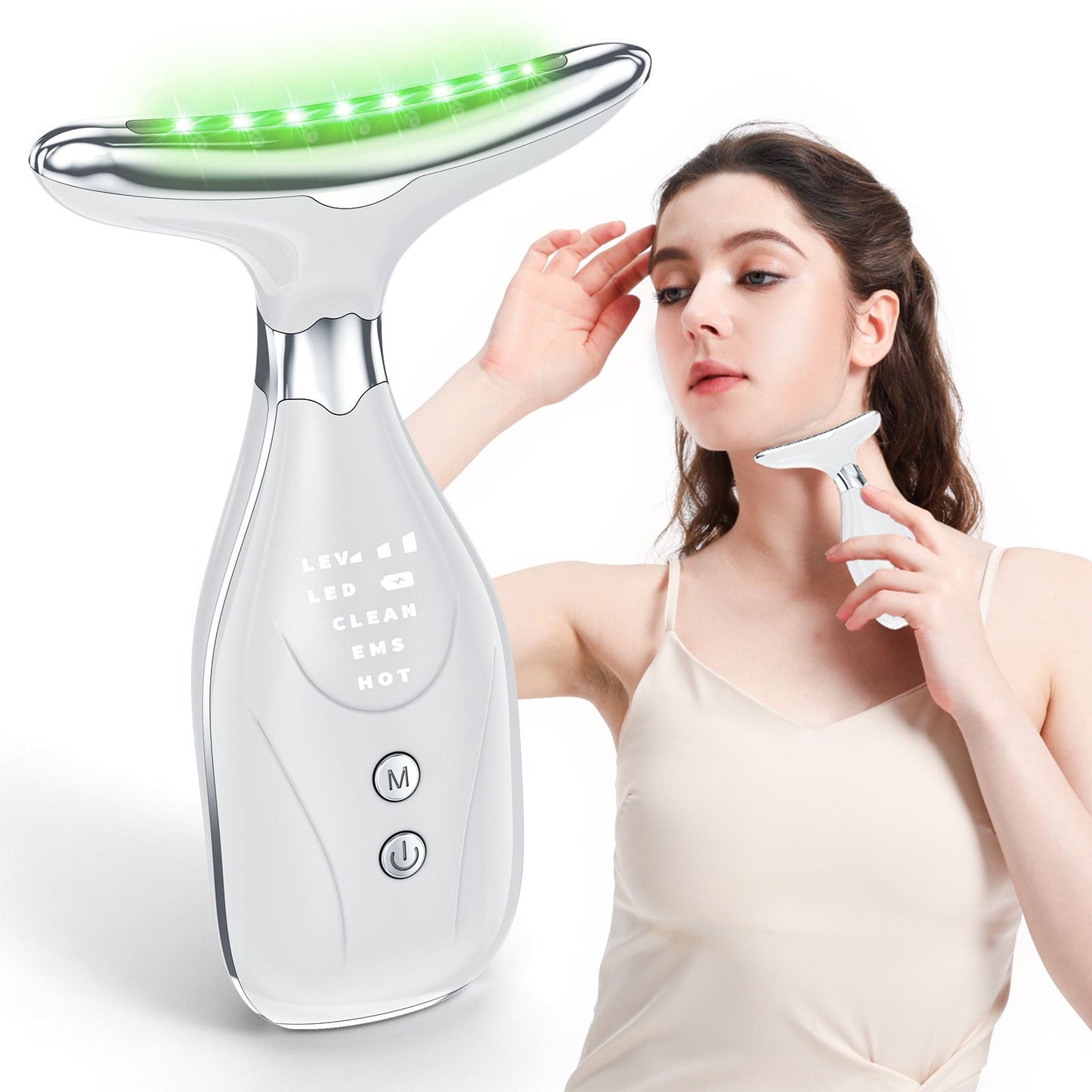
Multi-Function Facial & Neck Massager with LED Light Therapy, EMS & Warm Import - Rechargeable Skin Care Device(White)
In stock
Couldn't load pickup availability
Share

Multi-Function Facial & Neck Massager with LED Light Therapy, EMS & Warm Import - Rechargeable Skin Care Device
Product Description
Rejuvenate your complexion and reduce the appearance of wrinkles with our advanced Multi-Function Facial and Neck Massager. This innovative beauty device is designed to tighten saggy skin and release youthful vigor through a combination of technologies. It features 7 different LED light modes to target various skin concerns, along with three distinct massage modes: Clean Mode (ion export for deep pore cleansing), EMS Mode (for skin rejuvenation and wrinkle relief), and Hot Mode (warm import massage to promote skin circulation). The ergonomic design ensures comfortable use as you glide the device along your skin contours, moving from bottom to top on areas like the neck and forehead. Powered by a rechargeable battery and easy to operate, this skin care tool provides a professional-grade experience from the comfort of your home.
Key Features
- 7 LED Light Modes: Utilizes various light settings to help tighten saggy skin and promote a more youthful appearance.
-
Three Specialized Massage Modes:
- Clean Mode (Ion Export): Helps to draw out dirt and impurities from deep within pores.
- EMS Mode (EMS Function): Designed for skin rejuvenation and to help relieve the appearance of wrinkles.
- Hot Mode (Warm Import): Provides a soothing, tepid massage to promote skin circulation.
- Ergonomic & Adaptable Design: Shaped to comfortably glide along the contours of your face, neck, and forehead.
- Promotes Youthful Vigor: Works to improve skin elasticity and overall skin health.
- Easy to Use: Simple 4-step process for effective application, including contact with a conductive strip for proper functionality.
- Rechargeable & Portable: Built-in rechargeable battery allows for cordless use, making it convenient for home or travel.
- User-Friendly Controls: Features intuitive buttons for turning on/off, selecting modes, and activating light settings.
How to Use (4 Easy Steps)
- Apply your preferred skincare products after thoroughly cleansing your skin.
- Turn on the device and select your desired light setting and massage mode.
- Gently glide the massager along your skin contours, always moving from bottom to top. For the chin area, lift upwards from the bottom. For the forehead, lift upwards from the bottom.
- Ensure continuous contact with the conductive strip on the device for proper functionality during use.
Product Parameters
- Charging Voltage: 5V===1A
- Rated Power: 2.5W
- Charging Time: 2 hours
- Product Dimensions: 95mm x 35mm x 185mm
Important Notes
This product contains a lithium battery. Please do not aim any lights directly into eyes. This device is intended for cosmetic use and is not a medical device. For normal skin, using it two to three times a week is advisable. If you have sensitive or allergic skin, you can still use it, but the number of uses should be reduced accordingly. Always perform a patch test on a small area of skin before full application. Do not use on broken or irritated skin. Consult a healthcare professional before use if you have any underlying skin conditions or concerns. Keep the device clean and dry after each use. Keep out of reach of children.
Returns, Refunds and Replacements
Products received faulty, damaged, or not as described are eligible for a return, refund, or replacement in accordance with local consumer laws. We are committed to ensuring all products meet the standards of quality and reliability expected by our customers.
Please note that we do not accept returns or provide refunds for change of mind. We encourage you to carefully consider your purchase to ensure it meets your needs and expectations.
Delivery Timeframe
Delivery is approximately 5-10 business days (excluding weekends and public holidays).
Tips for protecting your children online
In today's digital age, ensuring your children's safety while they browse the internet is paramount. As they explore the vast online world through smartphones, gaming consoles, laptops, and other devices, it's essential to implement measures to shield them from potentially harmful content and interactions. Here are some tips to help you safeguard your children online:
1. Communication is Key
Open and ongoing communication with your children about online safety is crucial. Discuss the potential dangers they may encounter online, such as pornography, cyberbullying, and violent content. Encourage them to come to you with any concerns or questions they may have.
2. Set Clear Boundaries
Establish clear rules and boundaries regarding internet usage. Define appropriate time limits for browsing and specify which websites and apps are off-limits. Make sure your children understand the consequences of violating these rules. You can also restrict some of these apps or online content utilizing device level parental controls explained below.
3. Utilize Parental Controls
Take advantage of the parental control features available on devices and internet browsers. These controls allow you to block access to specific websites, set age-appropriate content filters, and monitor your children's online activities. Familiarize yourself with the parental control options on smartphones, gaming consoles, and laptops to effectively manage your children's online experiences.
4. Educate Yourself
Stay informed about the latest trends and technologies related to online safety. Familiarize yourself with popular social media platforms, gaming communities, and messaging apps that your children may use, including the functions they provide. This knowledge will help you understand the potential risks and take appropriate action to protect your children.
5. Monitor Their Online Activities
Regularly monitor your children's online activities to ensure they are adhering to the rules and staying safe. Keep an eye on their browsing history, social media interactions, and messaging apps. Be vigilant for any signs of cyberbullying or exposure to inappropriate content.
6. Encourage Safe Online Behavior
Teach your children about the importance of practicing safe online behavior. Remind them never to share personal information, such as their full name, address, or phone number, with strangers online. Encourage them to think critically about the content they encounter and to report anything that makes them feel uncomfortable or unsafe.
7. Lead by Example
Be a positive role model for your children by demonstrating responsible and respectful online behavior yourself. Show them how to navigate the internet safely and responsibly, and emphasize the importance of treating others with kindness and empathy online.
8. Reporting abuse, making complaints and finding more information
For additional resources and guidance on online safety, visit the Australian e-Safety Commissioner's website at www.esafety.gov.au. Here, you'll find a wealth of information, including tips for parents, educational resources for children, and tools for reporting online abuse and harassment.
You can also report abuse through the website’s online form.
By following these tips and utilizing available resources, you can help keep your children safe from pornography, cyberbullying, violent content, and other unsafe material while they navigate the internet. Remember, proactive measures and open communication are key to fostering a safe and positive online environment for your family.