After several months of use, I can confidently say this device has become a permanent fixture on my desk—and not just because I’m too busy to unplug it. The voice dictation works impressively well, saving both time and keyboard wear, while the video quality is sharp enough to make even Monday morning Zoom calls look respectable.
Whether you’re conferencing or simply attempting to look professional from your home office, the performance is consistently reliable. As someone with over 25–30 years in the IT industry, I don’t hand out praise lightly—but in this case, it’s well deserved.
In short, this is an excellent choice for everyday office use. Logitech continues its long-standing tradition of delivering quality products—thankfully, without requiring an IT support ticket to get started.
If only every piece of tech behaved this well, IT departments everywhere could finally take a proper coffee break.
Nikon
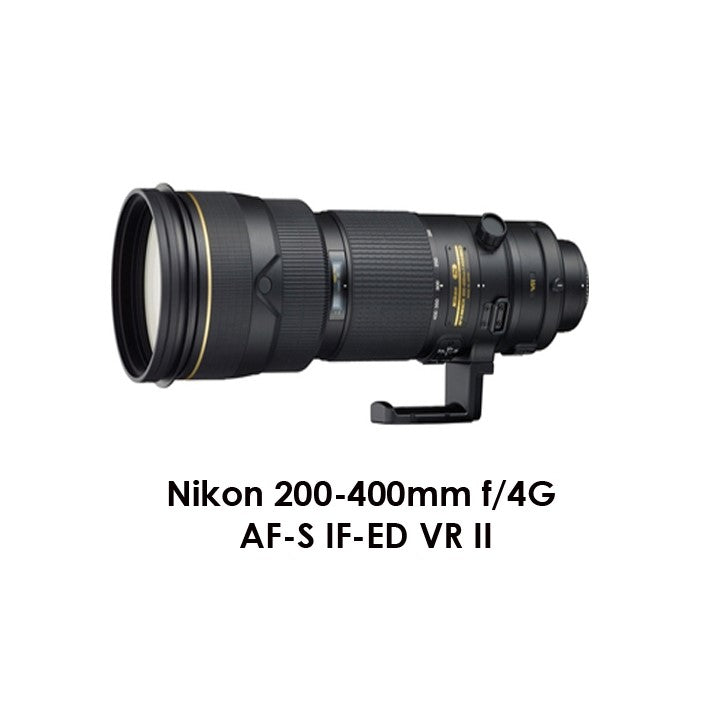
Nikon AF-S NIKKOR 200-400mm f/4G ED VR II Lens
Low stock: 5 left
Couldn't load pickup availability
Share
Nikon AF-S NIKKOR 200-400mm f/4G ED VR II Lens
An optical masterpiece: the super-telephoto zoom lens of choice for professionals.
For professionals seeking the ultimate super-telephoto zoom lens, the AF-S NIKKOR 200-400mm f/4G ED VR II delivers unrivaled speed, consistency, low-light performance and image quality in the most demanding situations. An advanced lens that draws peak performance from advanced FX-format D-SLRs, its an ideal choice for photographers who want to keep their gear to a minimum while on super-telephoto assignments that require the absolute finest images possible.

Super-telephoto zoom in a class of its own
Bring home shots that dazzle. The powerful and versatile AF-S NIKKOR 200-400mm f/4G ED VR II captures amazing images in nearly any light, making it a perfect lens for serious sports and wildlife photographers. Its f/4 fixed aperture renders beautiful background blur (bokeh) and lets you maintain an exposure across the entire focal length range. Nikon VR (Vibration Reduction) image stabilization provides 3.0 stops* of blur free handheld shooting, assuring dramatically sharper still images and HD video capture.
Stellar NIKKOR optics and advanced Nikon lens technologies
Key Features
- A super telephoto zoom lens supporting Nikon's exclusive range of focal lengths from 200 to 400mm
- Nano Crystal Coat significantly reduces ghost and flare
- Built-in vibration reduction (VR) offering camera shake compensation equivalent to a shutter speed increase of 3.0 stops*
- *Based on CIPA Standard. This value is achieved when attached to an FX-format digital SLR camera, with zoom set at the maximum telephoto position.
- Four ED glass elements minimize chromatic aberration for higher optical performance
- Three focus modes are available - A/M, M/A and M
Technology
- ED (Extra-Low Dispersion) Glass: An optical glass developed by Nikon that is used with normal optical glass in telephoto lenses to obtain optimum correction of chromatic aberrations.
- IF Lens: A NIKKOR lens in which only the internal lens group shifts during focusing. Thus, IF NIKKORS do not change in size during AF operation, allowing for compact, lightweight lenses capable of closer focusing distances. These lenses will be designated with the abbreviation IF on the lens barrel.
- Silent Wave Motor: AF-S NIKKOR lenses feature Nikon’s Silent Wave Motor (SWM). This technology converts “traveling waves” into rotational energy to focus the optics. This enables high-speed autofocusing that's extremely accurate and super quiet.
- M/A: Select NIKKOR lenses have a focusing mode which allows switching from automatic to manual focusing with virtually no lag time by simply turning the focusing ring on the lens. This makes it possible to seamlessly switch to fine manual focusing while looking through the viewfinder.
- A/M: A/M stands for Auto-Priority Manual Mode. This mode also enables an easy transition from autofocus to manual during AF operation. However, mode switch sensitivity has been altered to reduce the possibility of sudden unintentional switching to manual focus while shooting.
- Nano Crystal Coat: An anti-reflective coating developed by Nikon that virtually eliminates internal lens element reflections across a wide range of wavelengths. Nano Crystal Coat uses ultrafine, nano-sized* crystal particles to eliminate reflections inside the lens throughout the spectrum of visible light waves (380 to 780 nm) in ways that far exceed the limits of conventional antireflection coating systems. Nano Crystal Coat not only solves ghost effects caused by red light, which was incredibly difficult for previous systems. It also effectively reduces ghost and flare effects caused by light entering the lens diagonally. The result: clearer images.
- Vibration Reduction: A Nikon in-lens technology that improves image stability by automatically compensating for camera shake. Lenses that offer VR will feature the abbreviation VR on the lens barrel.
Specifications:
| Focal length | 200-400mm |
|---|---|
| Maximum aperture | f/4 |
| Minimum aperture | f/32 |
| Lens construction | 24 elements in 17 groups (with four ED glass elements, Nano Crystal Coat), and one detachable protective glass |
| Angle of view | 12°20' - 6°10' (8° - 4° with Nikon DX format) |
| Minimum focus distance | 2 m/6.6 ft. (in AF mode), 1.95 m/6.4 ft. (in MF mode) |
| Maximum reproduction ratio | 0.27x (in AF mode), 0.28x (in MF mode) |
| No. of diaphragm blades | 9 (rounded) |
| Filter-attachment size | 52mm |
| Diameter x length (extension from lens mount) |
Approximately 124 x 365.5 mm/4.9 x 14.4 in. |
| Weight | Approximately 3,360 g/7.4 lbs. (with protective glass) |
| Supplied accessories | Slip-on Front Lens Cap, Rear Lens Cap LF-1, Slip-on Hood HK-30, Semi-soft Case CL-L2, Dedicated slip-in filter holder, 52mm Screw-on NC Filter, Dedicated lens protective glass, Dedicated lens protective glass case, Strap LN-1 |
BRAND NEW
ONE YEAR WARRANTY
AUSTRALIAN SELLER
Tips for protecting your children online
In today's digital age, ensuring your children's safety while they browse the internet is paramount. As they explore the vast online world through smartphones, gaming consoles, laptops, and other devices, it's essential to implement measures to shield them from potentially harmful content and interactions. Here are some tips to help you safeguard your children online:
1. Communication is Key
Open and ongoing communication with your children about online safety is crucial. Discuss the potential dangers they may encounter online, such as pornography, cyberbullying, and violent content. Encourage them to come to you with any concerns or questions they may have.
2. Set Clear Boundaries
Establish clear rules and boundaries regarding internet usage. Define appropriate time limits for browsing and specify which websites and apps are off-limits. Make sure your children understand the consequences of violating these rules. You can also restrict some of these apps or online content utilizing device level parental controls explained below.
3. Utilize Parental Controls
Take advantage of the parental control features available on devices and internet browsers. These controls allow you to block access to specific websites, set age-appropriate content filters, and monitor your children's online activities. Familiarize yourself with the parental control options on smartphones, gaming consoles, and laptops to effectively manage your children's online experiences.
4. Educate Yourself
Stay informed about the latest trends and technologies related to online safety. Familiarize yourself with popular social media platforms, gaming communities, and messaging apps that your children may use, including the functions they provide. This knowledge will help you understand the potential risks and take appropriate action to protect your children.
5. Monitor Their Online Activities
Regularly monitor your children's online activities to ensure they are adhering to the rules and staying safe. Keep an eye on their browsing history, social media interactions, and messaging apps. Be vigilant for any signs of cyberbullying or exposure to inappropriate content.
6. Encourage Safe Online Behavior
Teach your children about the importance of practicing safe online behavior. Remind them never to share personal information, such as their full name, address, or phone number, with strangers online. Encourage them to think critically about the content they encounter and to report anything that makes them feel uncomfortable or unsafe.
7. Lead by Example
Be a positive role model for your children by demonstrating responsible and respectful online behavior yourself. Show them how to navigate the internet safely and responsibly, and emphasize the importance of treating others with kindness and empathy online.
8. Reporting abuse, making complaints and finding more information
For additional resources and guidance on online safety, visit the Australian e-Safety Commissioner's website at www.esafety.gov.au. Here, you'll find a wealth of information, including tips for parents, educational resources for children, and tools for reporting online abuse and harassment.
You can also report abuse through the website’s online form.
By following these tips and utilizing available resources, you can help keep your children safe from pornography, cyberbullying, violent content, and other unsafe material while they navigate the internet. Remember, proactive measures and open communication are key to fostering a safe and positive online environment for your family.