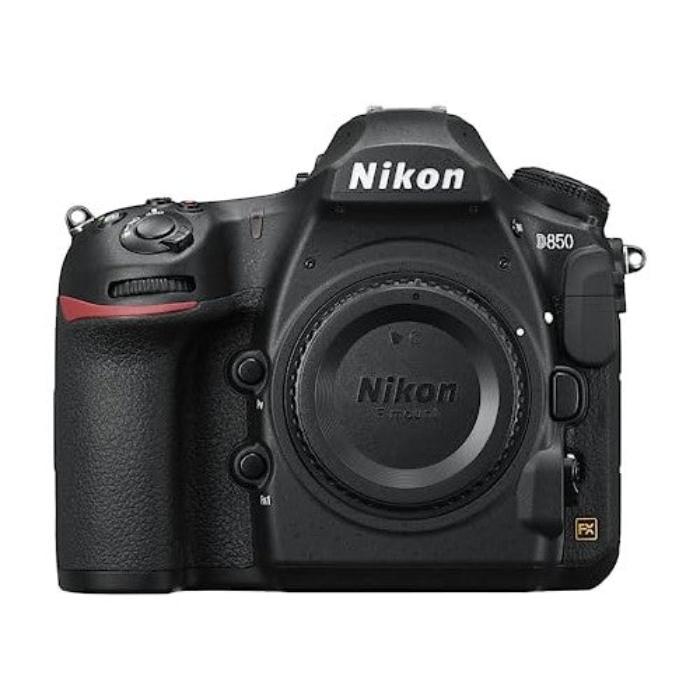
Nikon D850 Body Digital Camera - Black
- Nikon designed a backside illuminated (BSI) full-frame image sensor with no optical low-pass filter
- 45.7 megapixels of extraordinary resolution, outstanding dynamic range, and virtually no risk of moiré
- Up to 9 fps1 continuous shooting at full resolution with full AF performance
- 8k6 and 4k time-lapse movies with new levels of sharpness and detail; file system: DCF 2.0, EXIF 2.31, Pict bridge
- Tilting touchscreen, focus shift shooting mode, outstanding battery performance, and much more; total pixels: 46.89 million
- 4K Ultra HD video recording, slow motion up to 120 FPS at 1080p
D850: Extreme Resolution Meets Extreme Speed
When Nikon introduced the D800 and D800E, it set a new benchmark for DSLR image quality and super high-resolution photography that approached medium format. Now, five years later, Nikon proudly introduces the next evolution in high-resolution DSLRs, a camera that allows photographers to capture fast action in 45.7 megapixels of brilliant resolution. With remarkable advancements across the board—sensor design, autofocus, dynamic range, sensitivity, Speedlight control, battery life, shutter, and mirror drive mechanisms, Silent Photography in Live-View mode, focus shift capability, and more—this is quite possibly the most impressive, well-rounded DSLR yet.
Nikon's First Back-side Illuminated (BSI) Full-Frame Sensor
At the heart of the D850 is a Nikon-designed sensor like none before it—a back-side illuminated (BSI) FX-format full-frame CMOS image sensor with 45.7 megapixels and no optical low-pass filter. A marvel of ingenuity, it achieves extraordinary image quality, enhanced light-gathering efficiency, faster data readout, and truer color. And with such a dense array of pixels, there's virtually no risk of moiré.
Faster, Richer, Sharper Processing
Faster than EXPEED 4, EXPEED 5 quickly processes all 45.7 megapixels of data for lower noise, wider dynamic range, subtle tonal and textural details, and high-speed continuous shooting at approx. 9 fps1 and full-frame 4K UHD movie recording.
Sensitive to Every Little Detail
The lower the ISO, the greater the dynamic range. Like the D810 before it, the D850 has the lowest base ISO of any DSLR or mirrorless camera2—ISO 64 (expandable down to ISO 32).
Do Not Disturb
When silence is golden—shooting golf, press conferences, weddings and more—turn on Silent Photography in Live View and capture without sound or mechanical vibration. In Mode 1, shoot for up to 6 FPS continuous at 45.7 MP. In Mode 2, shoot approx. 8.6-megapixel pictures in DX image area at approx. 30 FPS for up to 3 seconds.
Tilt and Touch
The tilting touchscreen LCD screen makes it easy to get the shot, even from high or low angles. Use Touch AF, and Touch Shutter control and navigate menus, playback, and more as if you were using a smartphone. Zoom in during Live View shooting and use the new Pinpoint AF to put focus right where you want it.
Autofocus that Keeps Up
The D850 uses the same field-proven ultra-accurate AF system as the flagship D5. With 153 focus points, 99 cross-type sensors, and a dedicated AF processor, the D850 delivers all of its 45.7 MP performance with NIKKOR lenses. Shoot in low light to -4 EV. Capturing the most elusive subjects will feel like second nature with the D850.
Focus in Near Darkness
Autofocus down to -4 EV lets you capture in low-light situations. Suddenly, fast NIKKOR primes and zooms can handle even lower light than before.
Locked-on Subject Tracking
Nikon's exclusive AF engine uses parallel processing with a sequence control microcomputer to realize high AF performance for fast-moving subjects even during high-speed shooting.
Keeps up with the Action
With up to 7 FPS at 45.7 MP, the D850 can capture the decisive frame of a bride walking down the aisle or a fashion model's fluid pose. For nailing the shot at a high-speed race or of A-listers on the red carpet, try using the optional MB-D18 battery pack and shoot full resolution up to 9 FPS.
A Multimedia Powerhouse
Multimedia content creators rejoice. You are now free to record 16:9 4K Ultra HD (3840x2160) in full frame glory using the total width and resolution of the D850's back-side illuminated (BSI) CMOS sensor. Take advantage of the large sensor size for clean output at high ISO and for shooting with zero crop factor with any full-frame NIKKOR lenses4, including wide and ultra-wide angle lenses.
Quickly Confirm Focus
Confirm your manual focus with Focus Peaking. Select high, medium or low sensitivity and red, yellow, blue or white highlights. Operates in manual focus mode with AF or compatible manual NIKKOR lenses.
Light it Up
When combined with the optional WR-A10/R10 transceiver (requires firmware version 3.0 or later), the D850 can control and wirelessly fire radio-controlled SB-5000 Speedlights from another room, around corners or outdoors in bright sunlight.
4K Time-Lapse in Camera
Create entire 4K UHD time-lapse sequences right in the camera—exclusive to Nikon DSLRs. Use Silent Live View Mode to bypass the mechanical shutter and mirror movement, saving thousands of shutter cycles and improving the D850's already outstanding battery performance.
8K Time-Lapse Using Interval Timer
Render jaw-dropping 8K time-lapse movies by shooting sequences of up to 9,999 full-size stills, again using Silent Live View Mode. Using the D850's Interval Timer Mode allows you to capture over 8K-size images with exquisite detail for time-lapse movie6 creation. And with no shutter vibration, your sequences will be tack-sharp.
Your Images. The World. Connected.
Transfer your images to a compatible smartphone or tablet instantly using Nikon's SnapBridge app. The app maintains a constant connection with the D850 via Bluetooth Low Energy for seamless transfers, sharing your favorite shots, and even controlling the D850 for remote shooting.
Specifications:
| Performance |
| Producer |
Nikon |
| Effective pixels |
90 mln. |
| Sensor Chip (inch) |
Full frame |
| ISO rating |
Auto, 100 - 32000 / Auto, 200 - 6400 (expandable to 51000) |
| Image stabilization |
Yes |
| Shutter speed |
1/8000 - 30 sec |
| Continuous Drive |
9 k/s / 7 k/s |
| Movie Clips |
4K UHD (3840 x 2160) |
| Color |
| Delivery time |
5-19 w.d. |
| Storage |
| Storage types |
SD / SDHC / SDXC / XQD |
BRAND NEW
ONE YEAR WARRANTY
STOCK IN AUSTRALIA
AUSTRALIAN SELLER