Great product. I have to buy the adapter separately for Australia as this came with the japanese plug.
Great, excellent quality product. Delivered in record time. Highly recommended.
$0.00 AUD
Panasonic
Out of stock
Couldn't load pickup availability
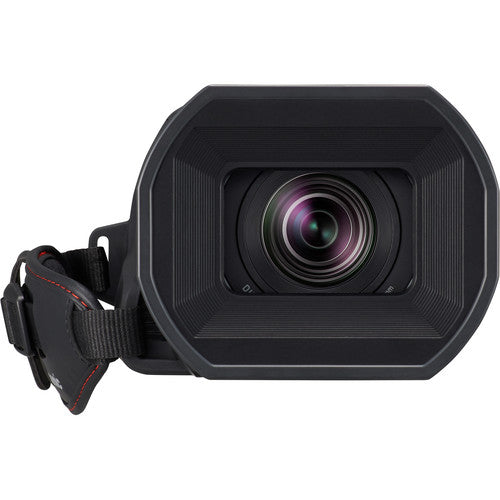
Panasonic HC-X1500 UHD 4K HDMI Pro Camcorder
The Panasonic HC-X1500 UHD 4K Pro Camcorder can meet both your main camera and behind-the-scenes (BTS) capture needs. This compact and lightweight camcorder records UHD 4K at broadcast-compatible frame rates, so it fits smoothly into your existing broadcast workflow. The HC-X1500 features a 1/2.5" 8.29M MOS sensor that always shoots at UHD 4K resolution, with the Venus processing engine scaling the 4K image for HD delivery via 3G-SDI or HDMI outputs. Record in either MP4, MOV, or AVCHD Progressive at rates ranging from 720p50 to UHD 4K60 to best suit your various projects. The built-in Leica Dicomar lens features a 24x, 25-600mm 35mm-equivalent zoom with a digital iZoom feature to zoom up to 48x.
The Face Detection AF feature enables you to track faces and automatically adjusts focus on your subject. It also features pro-style manual control rings, a control dial, and 5-axis optical image stabilization to keep your shots steady. The HC-X1500 can be used with a separately available top handle that has two 3-pin XLR audio inputs for line or mic level input, as well as a switch for +48V phantom power. The camera features built-in selectable 1/4, 1/16, and 1/64 ND mechanical filters for quick adjustments during changing lighting conditions. Manual adjustments are via dials set into the side of the camera so you can adjust the levels during the shot without having to pull up a menu function.


| Sensor Resolution: | Actual: 8.57 Megapixel Effective: 8.29 Megapixel |
| Image Sensor: | 1/2.5"-Type MOS |
| Image Stabilization: | Optical in Integrated Lens |
| Built-In ND Filter: | Mechanical Filter Wheel with Clear, 2-Stop (1/4), 4-Stop (1/16), 6-Stop (1/64) ND Filters |
| Capture Type: | Stills & Video |
| Shutter Type: | Not Specified by Manufacturer |
| Shutter Speed: | 1/8000 to 1/6 Second |
| Gain: | 0 to 30 dB |
| Minimum Illumination: | 1.5 Lux at 1/30 Shutter Speed |
| White Balance: | 2000 to 15,000K |
| Focal Length: | 4.1 to 98.9mm (35mm Equivalent Focal Length: 25 to 600mm) |
| Optical Zoom Ratio: | 24x |
| Max Digital Zoom: | 48x |
| Maximum Aperture: | f/1.8 |
| Minimum Aperture: | f/4 |
| Optical Design: | 14 Elements in 11 Groups |
| Minimum Focus Distance: | Wide: 0.3' / 0.1 m Telephoto: 3.9' / 1.2 m |
| Filter Size: | 62 mm |
| Control Rings: | Focus Zoom Iris |
| Focus Control: | Autofocus Manual Focus |
| Fast-/Slow-Motion Support: | Yes |
| Built-In Microphone Type: | Stereo |
| Audio Recording: | MOV: 2-Channel 24-Bit LPCM Audio MP4: 2-Channel 24-Bit AAC Audio AVCHD: 2-Channel 24-Bit AC-3 Audio |
| IP Streaming: |
RTMP, RTP, RTSP 320 x 180 to 1920 x 1080 at 25p, 30p, 50p, 60p (0.5 to 24.00 Mb/s) |
| Image File Format: | JPEG |
| Media/Memory Card Slot: | Dual Slot: SD/SDHC/SDXC (UHS-I) [U3/V30 or Faster Recommended] | ||||||
| Video I/O: | 1 x HDMI Output | ||||||
| Audio I/O: |
1 x 1/8" / 3.5 mm TRS Stereo Microphone Input 1 x 1/8" / 3.5 mm TRS Stereo Headphone Output |
||||||
| Power I/O: | 1 x Barrel (12VDC) Input | ||||||
| Other I/O: |
1 x Micro-USB Input 1 x 2.5 mm Sub-Mini Output |
||||||
| Wireless: | 2.4 GHz Wi-Fi 4 (802.11n) | ||||||
| Monitor: |
|
| Type: | Built-In Electronic (LCD) |
| Size: | 0.24" |
| Resolution: | 1,560,000 Dot |
| Focus Type: | Auto and Manual Focus |
| Focus Mode: | Automatic, Manual Focus |
| Operating Temperature: | 32.0 to 104.0°F / 0.0 to 40.0°C |
| Operating Humidity: | 10 to 80% |
| Battery Type: | Panasonic AG-VBR Series |
| Power Consumption: | 7.9 W |
| Tripod Mounting Thread: | 1/4"-20 Female |
| Accessory Mount: | 1 x Intelligent Hot Shoe |
| Dimensions (W x H x D): | 10.1 x 5.1 x 3.7" / 257 x 129 x 93 mm (Without Handle) |
| Weight: | 2.65 lb / 1.2 kg |
In today's digital age, ensuring your children's safety while they browse the internet is paramount. As they explore the vast online world through smartphones, gaming consoles, laptops, and other devices, it's essential to implement measures to shield them from potentially harmful content and interactions. Here are some tips to help you safeguard your children online:
Open and ongoing communication with your children about online safety is crucial. Discuss the potential dangers they may encounter online, such as pornography, cyberbullying, and violent content. Encourage them to come to you with any concerns or questions they may have.
Establish clear rules and boundaries regarding internet usage. Define appropriate time limits for browsing and specify which websites and apps are off-limits. Make sure your children understand the consequences of violating these rules. You can also restrict some of these apps or online content utilizing device level parental controls explained below.
Take advantage of the parental control features available on devices and internet browsers. These controls allow you to block access to specific websites, set age-appropriate content filters, and monitor your children's online activities. Familiarize yourself with the parental control options on smartphones, gaming consoles, and laptops to effectively manage your children's online experiences.
Stay informed about the latest trends and technologies related to online safety. Familiarize yourself with popular social media platforms, gaming communities, and messaging apps that your children may use, including the functions they provide. This knowledge will help you understand the potential risks and take appropriate action to protect your children.
Regularly monitor your children's online activities to ensure they are adhering to the rules and staying safe. Keep an eye on their browsing history, social media interactions, and messaging apps. Be vigilant for any signs of cyberbullying or exposure to inappropriate content.
Teach your children about the importance of practicing safe online behavior. Remind them never to share personal information, such as their full name, address, or phone number, with strangers online. Encourage them to think critically about the content they encounter and to report anything that makes them feel uncomfortable or unsafe.
Be a positive role model for your children by demonstrating responsible and respectful online behavior yourself. Show them how to navigate the internet safely and responsibly, and emphasize the importance of treating others with kindness and empathy online.
For additional resources and guidance on online safety, visit the Australian e-Safety Commissioner's website at www.esafety.gov.au. Here, you'll find a wealth of information, including tips for parents, educational resources for children, and tools for reporting online abuse and harassment.
You can also report abuse through the website’s online form.
By following these tips and utilizing available resources, you can help keep your children safe from pornography, cyberbullying, violent content, and other unsafe material while they navigate the internet. Remember, proactive measures and open communication are key to fostering a safe and positive online environment for your family.

Excellent service
Great product. I have to buy the adapter separately for Australia as this came with the japanese plug.
Great, excellent quality product. Delivered in record time. Highly recommended.