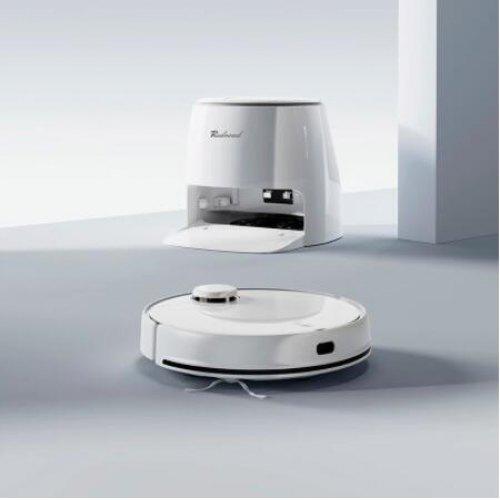
Redroad G10 Robotic Vacuum Cleaner & Mopping Sweeping - White
10m² Automatic Backwashing Mop. After 10㎡ cleanings, the machine automatically lifts the mopping cloth and self-cleaning mopping cloth.
450mL independent large dust box + wash-free mopping cloth can complete cleaning and can accommodate more garbage.
5200mAh large-capacity battery, long battery life; electrolytic water sterilization, strong sterilization, the ground is cleaner, dust-free and germ-free.
APP control options; imitation manual reciprocating vibration wipe mode, easy to mop up stubborn stains.
Identify the carpet after the mopping board lift, suction power increased, not wet carpet and carpet cleaning more effective.
Redroad G10 cleaning robot
Engage in something enjoyable while the Redroad G10 cleaning robot cleans your home for you. The device will vacuum and mop your floors, automatically get rid of dirt from its cleaning parts and replenish the energy needed for further work in the included station. The water electrification function will ensure sterilization of the cleaned surfaces, and the 4 available suction levels will allow for more thorough cleaning. The vacuum cleaner's mop has a high vibration frequency, reaching up to 3,000 rpm, lifting dirt, even from deeper places. The vacuum cleaner intelligently detects the surface it cleans, including carpets, and thanks to artificial intelligence and location algorithms, it will find its way around your home ideally. You can conveniently operate it using an app and voice commands.
Self-cleaning mop
When the G10 detects that its brushes need cleaning, it instinctively returns to its position. Then the cleaning elements are sprayed with water and, thanks to rapid rotation, cleaned. At the same time, a nozzle at the bottom of the station pumps the dirty water into a dedicated reservoir to avoid re-soiling and mixing of liquids.
Intelligent surface detection
The Red road G10 has a surface detection function. When vacuuming, it will automatically switch to the appropriate suction power to clean the surface fully effectively and pick up when it detects carpet. When cleaning floors, it will intelligently bypass surfaces that have already been cleaned.
Cleanliness is health
When the Redroad G10 finishes its work and returns to its station, its mops are rinsed with electrified, sterilized water. This process will not only ensure that the unit is clean and ready for the next cleaning, but will also prevent mould and exclude the possibility of bacterial growth.
Reliable in the fight against dirt
The maximum suction power of the G10 is as high as 2,800 Pa, which means that it can easily cope with even the most stubborn dirt. You can customize its performance to your needs, choosing from up to 4 available power levels. The robot works at 3000 rpm - leaving your floors clean and shiny.
It will easily find its way around your home
The robot is equipped with an advanced LDS laser and 8 precision sensors. As a result, it quickly and accurately scans rooms, maps them in real-time and plans the most suitable cleaning routes. The presence of sensors makes it safe for G10 to move around the house. For example, it is not in danger of falling down the stairs or colliding with furniture.
Dedicated app
Dreaming of an even more convenient operation of your robot? Pair it with an app and control it remotely! You can also use your smartphone to change settings, set cleaning schedules, and even create virtual walls and forbidden zones to prevent G10 from accessing certain areas - for example, your child's room. It's also possible to control the robot with simple voice commands.
Long working time
The device stands out with a long-lasting 5200 mAh battery. This is enough to clean floors with a total surface area of up to 180 m2. It doesn't matter whether you have a small apartment or a very large house - the G10 is sure to meet your needs.
SPECIFICATIONS
BODY
Size: 35.3 x 35.3 x 9.65 cm, 45 x 41 x 39 cm (Base)
Weight: 4.1kg, 7.97 kg (Base)
Colour: White
BATTERY
Battery capacity: 5200mAh
Battery Life: 240min
Charging time: 4 hours
Auto-return and Charging: Yes
Navigation: LDS Laser Navigation
Algorithm: ToF
Suction power: 2800Pa
Cleaning area: 180m²
Mopping function: Yes
Dust Box Capacity: 450ml
Water tank capacity: 4.5L (Base Station)
Filter: HEPA
Noise: 72dB
Control: App
Functions: Anti-collision sensor, Automatic room recognition, Charging Base, Cleaning of Selected Areas, Dry Mopping Mode, High-efficiency filtration up to 99%, Map Management, Mopping Mode, One-click Self-cleaning, Recognize carpet, Ultraviolet sterilization.
BRAND NEW ONE YEAR WARRANTY STOCK IN AUSTRALIA AUSTRALIAN SELLER
Tips for protecting your children online
In today's digital age, ensuring your children's safety while they browse the internet is paramount. As they explore the vast online world through smartphones, gaming consoles, laptops, and other devices, it's essential to implement measures to shield them from potentially harmful content and interactions. Here are some tips to help you safeguard your children online:
1. Communication is Key
Open and ongoing communication with your children about online safety is crucial. Discuss the potential dangers they may encounter online, such as pornography, cyberbullying, and violent content. Encourage them to come to you with any concerns or questions they may have.
2. Set Clear Boundaries
Establish clear rules and boundaries regarding internet usage. Define appropriate time limits for browsing and specify which websites and apps are off-limits. Make sure your children understand the consequences of violating these rules. You can also restrict some of these apps or online content utilizing device level parental controls explained below.
3. Utilize Parental Controls
Take advantage of the parental control features available on devices and internet browsers. These controls allow you to block access to specific websites, set age-appropriate content filters, and monitor your children's online activities. Familiarize yourself with the parental control options on smartphones, gaming consoles, and laptops to effectively manage your children's online experiences.
4. Educate Yourself
Stay informed about the latest trends and technologies related to online safety. Familiarize yourself with popular social media platforms, gaming communities, and messaging apps that your children may use, including the functions they provide. This knowledge will help you understand the potential risks and take appropriate action to protect your children.
5. Monitor Their Online Activities
Regularly monitor your children's online activities to ensure they are adhering to the rules and staying safe. Keep an eye on their browsing history, social media interactions, and messaging apps. Be vigilant for any signs of cyberbullying or exposure to inappropriate content.
6. Encourage Safe Online Behavior
Teach your children about the importance of practicing safe online behavior. Remind them never to share personal information, such as their full name, address, or phone number, with strangers online. Encourage them to think critically about the content they encounter and to report anything that makes them feel uncomfortable or unsafe.
7. Lead by Example
Be a positive role model for your children by demonstrating responsible and respectful online behavior yourself. Show them how to navigate the internet safely and responsibly, and emphasize the importance of treating others with kindness and empathy online.
8. Reporting abuse, making complaints and finding more information
For additional resources and guidance on online safety, visit the Australian e-Safety Commissioner's website at www.esafety.gov.au. Here, you'll find a wealth of information, including tips for parents, educational resources for children, and tools for reporting online abuse and harassment.
You can also report abuse through the website’s online form.
By following these tips and utilizing available resources, you can help keep your children safe from pornography, cyberbullying, violent content, and other unsafe material while they navigate the internet. Remember, proactive measures and open communication are key to fostering a safe and positive online environment for your family.
I love it! I finally ticked of my dream to have a robot vacuum! It took a while to set up, several hours of fussing around with signing up to the app, finding a server (I had to try over and over again and eventually had success with the North America one), tweaking my router settings to split my wifi into 2.4GHz, but after all that it works flawlessly day-to-day and Im so happy with my purchase. Its a great little device that has responded to all the cleaning tasks Ive given it with no issues so far. My floors have never been cleaner!
Choosing a selection results in a full page refresh.
We recently received our order for a 9th Gen IPad and was impressed with the price, delivery time and the quality of the article ordered
It was difficult to tell the difference between the one received and a new one.
Wife was very pleased.