After several months of use, I can confidently say this device has become a permanent fixture on my desk—and not just because I’m too busy to unplug it. The voice dictation works impressively well, saving both time and keyboard wear, while the video quality is sharp enough to make even Monday morning Zoom calls look respectable.
Whether you’re conferencing or simply attempting to look professional from your home office, the performance is consistently reliable. As someone with over 25–30 years in the IT industry, I don’t hand out praise lightly—but in this case, it’s well deserved.
In short, this is an excellent choice for everyday office use. Logitech continues its long-standing tradition of delivering quality products—thankfully, without requiring an IT support ticket to get started.
If only every piece of tech behaved this well, IT departments everywhere could finally take a proper coffee break.
Tristar Online
Smart UVC Toothbrush Sterilizer & Holder with Heat Drying, Radar Sensor Night Light(white)
In stock
Couldn't load pickup availability
Share

Smart UVC Toothbrush Sterilizer & Holder with Heat Drying, Radar Sensor Night Light
Product Description
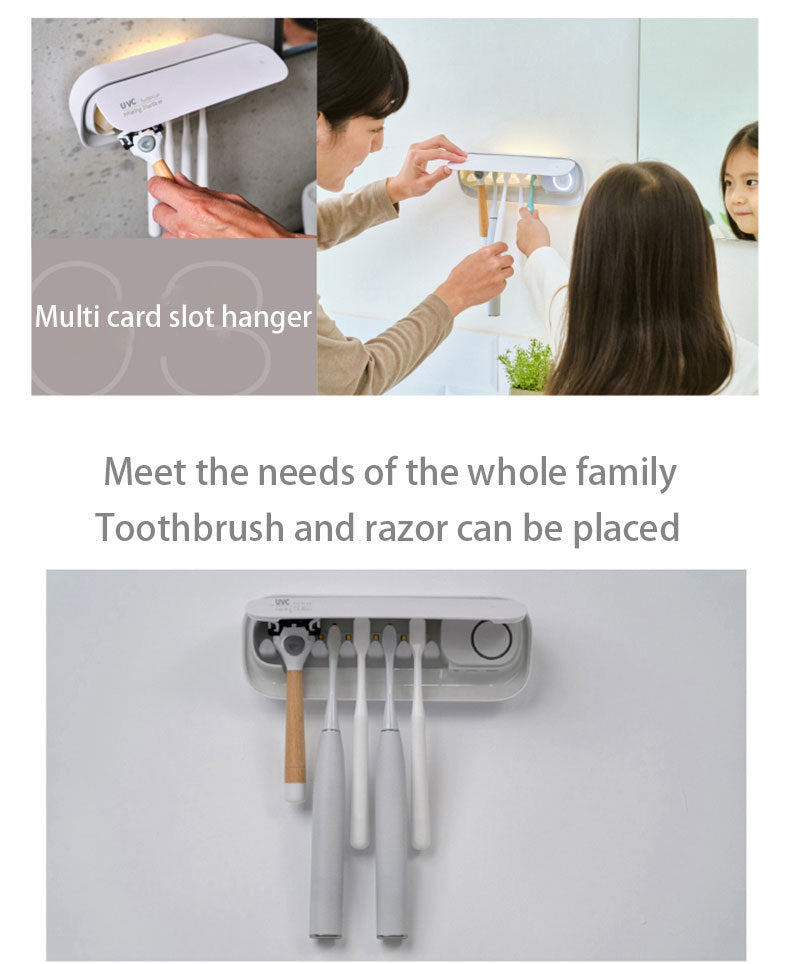
Elevate your bathroom hygiene with our Smart Toothbrush Sterilizer, designed to keep your toothbrush clean and dry every day. This all-in-one device functions as both a toothbrush storage rack and a powerful sterilizer, utilizing UVC ultraviolet radiation for 99.9% efficient sterilization, as tested by SGS. It features a 45C heat drying and air-drying function to ensure your toothbrushes are thoroughly dried. With both manual and automatic modes, you can choose a one-time cycle or have it automatically disinfect and dry at 4-hour intervals. The elegant and simple design includes a multi-card slot hanger to accommodate the whole family's toothbrushes and even a razor. For added convenience, it has a radar sensor night light that gradually illuminates as you approach. The device is easy to install with no construction required and is rechargeable via a modern Type-C port, offering long battery life with charging needed only about once a month.
Key Features
- 99.9% Efficient UVC Sterilization: Uses UVC ultraviolet radiation (wavelength 275nm) with an intensity of more than 400 u m/cm2 to effectively eliminate 99.9% of bacteria by damaging their DNA.
- Heat & Air Drying: A 45C heat drying cycle ensures toothbrushes are thoroughly dried, preventing moisture build-up.
-
Dual Operating Modes:
- Manual Mode: Air drying, heating drying for 300 seconds + sanitize for 300 seconds.
- Automatic Mode: Disinfection + air drying + heating dry cycles in sequence at 4-hour intervals.
- Radar Sensor Night Light: Intimate lighting that senses movement and gradually lights up, perfect for nighttime use.
- Multi-Slot Hanger: Accommodates multiple toothbrushes (both manual and electric) and a razor, meeting the needs of the whole family.
- Drill-Free Installation: Installs quickly and easily with a strong adhesive backing, suitable for surfaces like glass, ceramic tile, board, and stone.
- Type-C Charging & Long Battery Life: Rechargeable via USB Type-C, with a long-lasting battery that requires charging only about once a month. Features multiple protection circuits (overshoot, overcurrent, overload, overheating).
- Safety Mechanisms: Includes an open cover and stop safety mechanism, making it safe for use even with children around. The internal bracket is detachable for easy cleaning.
- Elegant Design: Simple and versatile design available in classic finishes to complement any bathroom decor.
Package Contents
- 1 x Smart UVC Toothbrush Sterilizer Unit
- 1 x Adhesive Wall Mount
- 1 x USB Type-C Charging Cable
- 1 x User Manual
Specifications
- Product Type: Smart UVC Toothbrush Sterilizer and Holder
- Sterilization Method: UVC Ultraviolet Radiation
- Drying Method: 45C Heat Drying & Air Drying
- Modes: Manual & Automatic (4-hour cycle)
- Features: Radar Sensor Night Light, Multi-Slot Hanger, Detachable Bracket, Safety Stop Mechanism
- Installation: Adhesive Mount (Drill-Free)
- Charging: USB Type-C
- Battery Indicator: LED ring (e.g., normal battery, low battery/charging)
Important Notes
This product contains a lithium battery. Avoid direct eye exposure to the UVC light. Ensure the wall surface is clean and dry before applying the adhesive mount. Press firmly and allow the adhesive to set for 24 hours before hanging the main unit. Toothbrushes and razor shown in images are for illustrative purposes only and are not included. Clean the detachable bracket regularly to maintain hygiene. The sterilization rate is based on laboratory tests; actual performance may vary slightly.
Returns, Refunds and Replacements
Products received faulty, damaged, or not as described are eligible for a return, refund, or replacement in accordance with local consumer laws. We are committed to ensuring all products meet the standards of quality and reliability expected by our customers.
Please note that we do not accept returns or provide refunds for change of mind. We encourage you to carefully consider your purchase to ensure it meets your needs and expectations.
Delivery Timeframe
Delivery is approximately 5-10 business days (excluding weekends and public holidays).
Tips for protecting your children online
In today's digital age, ensuring your children's safety while they browse the internet is paramount. As they explore the vast online world through smartphones, gaming consoles, laptops, and other devices, it's essential to implement measures to shield them from potentially harmful content and interactions. Here are some tips to help you safeguard your children online:
1. Communication is Key
Open and ongoing communication with your children about online safety is crucial. Discuss the potential dangers they may encounter online, such as pornography, cyberbullying, and violent content. Encourage them to come to you with any concerns or questions they may have.
2. Set Clear Boundaries
Establish clear rules and boundaries regarding internet usage. Define appropriate time limits for browsing and specify which websites and apps are off-limits. Make sure your children understand the consequences of violating these rules. You can also restrict some of these apps or online content utilizing device level parental controls explained below.
3. Utilize Parental Controls
Take advantage of the parental control features available on devices and internet browsers. These controls allow you to block access to specific websites, set age-appropriate content filters, and monitor your children's online activities. Familiarize yourself with the parental control options on smartphones, gaming consoles, and laptops to effectively manage your children's online experiences.
4. Educate Yourself
Stay informed about the latest trends and technologies related to online safety. Familiarize yourself with popular social media platforms, gaming communities, and messaging apps that your children may use, including the functions they provide. This knowledge will help you understand the potential risks and take appropriate action to protect your children.
5. Monitor Their Online Activities
Regularly monitor your children's online activities to ensure they are adhering to the rules and staying safe. Keep an eye on their browsing history, social media interactions, and messaging apps. Be vigilant for any signs of cyberbullying or exposure to inappropriate content.
6. Encourage Safe Online Behavior
Teach your children about the importance of practicing safe online behavior. Remind them never to share personal information, such as their full name, address, or phone number, with strangers online. Encourage them to think critically about the content they encounter and to report anything that makes them feel uncomfortable or unsafe.
7. Lead by Example
Be a positive role model for your children by demonstrating responsible and respectful online behavior yourself. Show them how to navigate the internet safely and responsibly, and emphasize the importance of treating others with kindness and empathy online.
8. Reporting abuse, making complaints and finding more information
For additional resources and guidance on online safety, visit the Australian e-Safety Commissioner's website at www.esafety.gov.au. Here, you'll find a wealth of information, including tips for parents, educational resources for children, and tools for reporting online abuse and harassment.
You can also report abuse through the website’s online form.
By following these tips and utilizing available resources, you can help keep your children safe from pornography, cyberbullying, violent content, and other unsafe material while they navigate the internet. Remember, proactive measures and open communication are key to fostering a safe and positive online environment for your family.