Microsoft
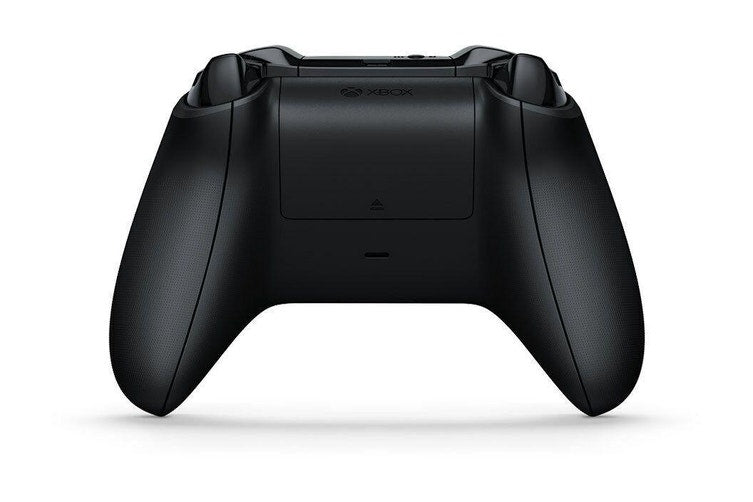
Xbox One Controller - Carbon Black (Au Version) - Pristine - Refurbished
Out of stock
Couldn't load pickup availability
Share
Xbox One Controller - Carbon Black (Au Version) - Pristine - Refurbished
- Ergonomic Design: Designed with a comfortable and sleek Carbon Black finish for extended gaming sessions and a refined look.
- Enhanced Precision: Features responsive thumbsticks and triggers that provide precise control and improved accuracy in gameplay.
- Textured Grips and Triggers: Includes textured grips and triggers for better handling and control, reducing slippage during intense gaming moments.
- Wireless Connectivity: Connects wirelessly to the Xbox One console, offering a clutter-free gaming experience with reliable connectivity.
- 3.5mm Audio Jack: Equipped with a 3.5mm stereo headset jack, allowing you to connect compatible headsets for in-game audio and chat.
- Customizable Controls: Compatible with the Xbox Accessories app, enabling button mapping and customization of controls to suit your gaming preferences.
- Built-in Bluetooth: Supports Bluetooth connectivity for gaming on Windows 10 PCs and tablets, providing versatility across different gaming platforms.
- Long Battery Life: Designed to be energy efficient, extending battery life for longer uninterrupted gaming sessions.
- Vibration Feedback: Includes built-in vibration motors for immersive feedback, enhancing the gaming experience by providing physical responses to in-game actions.
- Durable Build: Constructed for durability to withstand rigorous gaming use and to maintain performance over time.
Product Description:
leek and Ergonomic Design
The Xbox One Controller in Carbon Black offers a sleek, modern look with its refined Carbon Black finish. Designed with ergonomics in mind, this controller fits comfortably in your hands, making it ideal for extended gaming sessions. The contoured shape and lightweight build ensure a comfortable grip, reducing hand fatigue during intense gameplay.
Precision and Control
Equipped with responsive thumbsticks and triggers, this controller provides precise control and enhanced accuracy. Whether you're navigating complex game environments or executing intricate maneuvers, the improved sensitivity and responsiveness of the controls help you stay in command. The textured grips and triggers further enhance your ability to handle the controller with confidence, ensuring a secure grip even during the most action-packed moments.
Versatile Connectivity
The Xbox One Controller features wireless connectivity, allowing you to play without the hassle of cables. It connects seamlessly to your Xbox One console, providing a reliable connection for uninterrupted gaming. Additionally, the controller supports Bluetooth, making it compatible with Windows 10 PCs and tablets, offering versatility for gaming across different platforms.
Enhanced Audio Experience
For an immersive audio experience, the controller includes a 3.5mm stereo headset jack. This allows you to connect compatible headsets for in-game audio and voice chat, ensuring you can communicate with teammates and experience game soundscapes fully. The built-in audio controls provide convenient access to adjust volume and mute settings directly from the controller.
Customizable and Durable
Customize your gaming experience with the Xbox Accessories app, which lets you map buttons and adjust controls to fit your preferences. The controller is designed for durability, with a robust build that withstands rigorous use. Long battery life ensures you can play for extended periods without frequent interruptions, making the Xbox One Controller a reliable and essential accessory for any serious gamer.
Specifications:
- Color: Carbon Black
- Design: Ergonomic, contoured shape
- Connectivity: Wireless (to Xbox One console), Bluetooth (for Windows 10 PCs and tablets)
- Controls: Responsive thumbsticks, triggers with textured grips
- Audio Jack: 3.5mm stereo headset jack
- Customization: Compatible with Xbox Accessories app for button mapping
- Vibration Feedback: Built-in vibration motors
- Battery: Long battery life (requires AA batteries or rechargeable battery pack)
- Build: Durable construction for extended use
Note: This product will come with either the original box or a compatible generic box and accessories.
This model has undergone careful inspection and testing and is in Pristine condition.
Tips for protecting your children online
In today's digital age, ensuring your children's safety while they browse the internet is paramount. As they explore the vast online world through smartphones, gaming consoles, laptops, and other devices, it's essential to implement measures to shield them from potentially harmful content and interactions. Here are some tips to help you safeguard your children online:
1. Communication is Key
Open and ongoing communication with your children about online safety is crucial. Discuss the potential dangers they may encounter online, such as pornography, cyberbullying, and violent content. Encourage them to come to you with any concerns or questions they may have.
2. Set Clear Boundaries
Establish clear rules and boundaries regarding internet usage. Define appropriate time limits for browsing and specify which websites and apps are off-limits. Make sure your children understand the consequences of violating these rules. You can also restrict some of these apps or online content utilizing device level parental controls explained below.
3. Utilize Parental Controls
Take advantage of the parental control features available on devices and internet browsers. These controls allow you to block access to specific websites, set age-appropriate content filters, and monitor your children's online activities. Familiarize yourself with the parental control options on smartphones, gaming consoles, and laptops to effectively manage your children's online experiences.
4. Educate Yourself
Stay informed about the latest trends and technologies related to online safety. Familiarize yourself with popular social media platforms, gaming communities, and messaging apps that your children may use, including the functions they provide. This knowledge will help you understand the potential risks and take appropriate action to protect your children.
5. Monitor Their Online Activities
Regularly monitor your children's online activities to ensure they are adhering to the rules and staying safe. Keep an eye on their browsing history, social media interactions, and messaging apps. Be vigilant for any signs of cyberbullying or exposure to inappropriate content.
6. Encourage Safe Online Behavior
Teach your children about the importance of practicing safe online behavior. Remind them never to share personal information, such as their full name, address, or phone number, with strangers online. Encourage them to think critically about the content they encounter and to report anything that makes them feel uncomfortable or unsafe.
7. Lead by Example
Be a positive role model for your children by demonstrating responsible and respectful online behavior yourself. Show them how to navigate the internet safely and responsibly, and emphasize the importance of treating others with kindness and empathy online.
8. Reporting abuse, making complaints and finding more information
For additional resources and guidance on online safety, visit the Australian e-Safety Commissioner's website at www.esafety.gov.au. Here, you'll find a wealth of information, including tips for parents, educational resources for children, and tools for reporting online abuse and harassment.
You can also report abuse through the website’s online form.
By following these tips and utilizing available resources, you can help keep your children safe from pornography, cyberbullying, violent content, and other unsafe material while they navigate the internet. Remember, proactive measures and open communication are key to fostering a safe and positive online environment for your family.