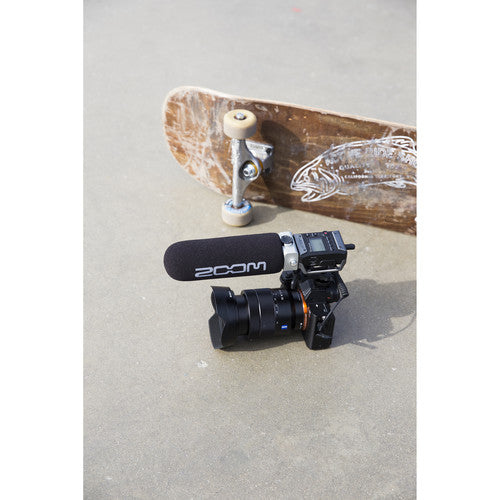
Zoom F1-SP 2-Input / 2-Track Portable Field Recorder with Shotgun Microphone
- Run & Gun Video, Interviews
- 3-Capsule Shotgun Microphone
- Limiter & Auto-Level Prevent Distortion
- Records Stereo MP3 or Hi-Res WAV
- 3.5mm Stereo Mic/Line Input
- Compatible with Zoom Mic Capsules
- Up to 11 Hours via AAA Batteries
- microSD Card / USB Interface Recording
- One-Touch Controls, Easy-to-Read Display
- Shockmount for Low-Noise Camera Mounting
Product Description
Record clear, crisp dialog in a hurry for your next run-and-gun video shoot or interview with the Zoom F1-SP, a 2-track portable field recorder with an onboard limiter and auto-level control providing distortion-free 24-bit audio, and 3-capsule, supercardioid shotgun microphone for easy setup on your camera. Whereas other F-Series recorders such as the F4, F6, and F8n are centered around a sound bag–ready form factor, the F1-SP's diminutive size is tailored for camera- or tripod-mounted placement.
From the easy-to-read backlit display and simple one-touch controls to the long battery life, the F1-SP is properly equipped to serve you reliably, regardless of your audio background. Whether you need long-duration recording for a wedding, professional audio capture for an interview, or a space-saving setup for outdoor shoots, the F1-SP is ready to handle your crucial audio tasks.
Plus, its operational simplicity ensures that the F1-SP will never get in the way of your workflow, be it simple, complex, or always changing. You can feel confident using it as your main recorder, a USB audio interface for your dedicated computer or iPad rig, or a backup unit for added safety.
Directional 3-Capsule Shotgun Microphone
The included SGH-6 mono shotgun microphone attaches directly to the 10-pin Zoom mic capsule input, no cables needed! It features three internal mic capsules to produce a supercardioid polar pattern that delivers focused directionality across the frequency spectrum. Step back from your subject to get the right shot, and know that the SGH-6 is accurately delivering the sound of your source.
Shockmount Reduces Vibration and Handling Noise
Supplied with the F1-SP is an SMF-1 shockmount, which was engineered to eliminate unwanted thumping sounds caused by vibrations when shooting on the move. It also grants easy attachment to your DSLR camera.
Configurable Recording Settings
The F1-SP boasts a slew of recording resolutions to choose from—48 to 320 kb/s in MP3 format, or up to 24-bit / 96 kHz in uncompressed WAV format. Also, a pre-record function allows you to capture approximately two seconds of audio before you press the record button, and a low-cut filter attenuates rumble for cleaner voice recordings.
Record Direct to microSD Cards
Maximize portability by recording directly to a microSD/microSDHC card (available separately) for up to 32 GB of storage space. Select MP3 format if you really need extended time and minimal file size, or use the BWF-compliant WAV format for uncompressed audio quality and industry-standard file compatibility.
Audio Interface Functionality
Alternatively, use the F1-SP as an 2-in/2-out USB 2.0 audio interface at up to 16-bit / 48 kHz. Connect it to your computer or iPad, launch your preferred audio recording program, then enjoy the combination of the F1-SP's sonically solid front end, plus the familiarity and features of your favorite software.
Zoom Mic Capsule Input
A proprietary 10-pin Zoom mic capsule input on the F1-SP accommodates Zoom's line of interchangeable capsules (available separately) in place of the standard mic/line input. With mid-side, X/Y, and stereo shotgun mic capsules to choose from, you can be ready to record music, dialog, or sound effects without carting an external microphone setup. There's even the EXH-6 input capsule (available separately) if you need dual XLR-1/4" combo inputs.
Headphone/Line Output with Volume Control
A locking 3.5mm stereo output jack with a dedicated volume control enables straightforward routing to your camera, DSLR, secondary recorder, or headphones.
Power for Hours
To keep up with the pace of on-location production, the F1-SP can be powered via two AAA batteries or a Zoom AD-17 power adapter (available separately). Even at 24-bit / 48 kHz, you get plenty of recording time—up to 11 hours with lithium batteries or up to 6.5 hours with alkaline batteries. All-day shoots are no problem for the F1-SP.
Multifunction Micro-USB Port
A micro-USB port on the F1-SP serves several functions. Connect it to a computer for convenient data exchange, or hook it up to an iOS device (or computer) to use the F1-SP as a miniature audio interface.
Specifications
| Number of Tracks |
2 |
| Maximum Sampling Rate |
96 kHz / 24-Bit |
| Microphone |
Interchangeable Supercardioid Shotgun |
| Built-In Speaker |
No |
| Display |
Monochrome LCD (Backlit) |
| Memory Card Support |
microSD, microSDHC (Up to 32 GB) |
| Internal Storage |
None |
Recording
| Audio File Formats |
BWF, ID3v1, MP3, WAV |
| Sample Rates |
44.1 / 48 / 96 kHz |
| Bit Depth |
16 / 24-Bit |
| Bit Rates |
48 to 320 kb/s |
| Signal Processing & FX |
Auto Gain, Limiter, Low-Cut Filter |
| Timecode Support |
No |
Connectivity
| Analog I/O |
1 x Proprietary 10-Pin Mic Capsule Input
1 x 1/8" / 3.5 mm TRS Female Unbalanced Line/Mic Input (Lockable)
1 x 1/8" / 3.5 mm TRS Female Unbalanced Headphone/Line Output (Lockable) |
| Digital I/O |
None |
| Phantom Power |
None |
| Plug-In Power |
Yes, 2.5 V |
| Host Connection |
1 x Micro-USB (2.0) |
Performance
| Gain/Trim Range |
Mic/Line Inputs:
-12 to +36 dB
Shotgun Mic Capsule:
Up to +50 dB |
| Headphone Output Power |
11 mW per Channel into 32 Ohms |
| Impedance |
Inputs:
Greater than 2 Kilohms |
| Microphone Sensitivity |
-39 dB/Pa |
| Microphone Max SPL |
122 dB SPL |
Power
| Power Options |
Battery or AC/DC Power Adapter |
| Battery Type |
2 x AAA (Not Included) |
| Approximate Battery Life |
48 kHz/24-Bit:
6.5 Hours (Alkaline, Mono)
6 Hours (NiMH, Mono)
11 Hours (Lithium, Mono) |
| AC/DC Power Adapter |
5 VDC at 1 A (Not Included) |
Physical
| Mounting Options |
Shoe Mount |
| Dimensions |
2.5 x 3.1 x 1.3" / 64 x 79.8 x 33.3 mm |
| Weight |
4.2 oz / 120 g (without Batteries) |
Packaging Info
| Package Weight |
1.44 lb |
| Box Dimensions (LxWxH) |
11.5 x 8.45 x 3" |