Great product. I have to buy the adapter separately for Australia as this came with the japanese plug.
Great, excellent quality product. Delivered in record time. Highly recommended.
$0.00 AUD
Zoom
Out of stock
Couldn't load pickup availability
Zoom U-24 Portable 2x4 USB Handy Audio/MIDI Interface
The U-24 is a compact, 2-in/4-out audio interface that provides all of the essential tools you need for recording and performing with high resolution, 24-bit/96 kHz audio—anywhere you go. Get incredible sound quality thanks to high-quality, low-noise preamps—the same ones found on our acclaimed H5 and H6 Handy Recorders. Connect to your PC, Mac, or iPhone/iPad via USB and record mics, instruments, and more. The U-24 delivers the same great sound as our U-44 interface, with a more streamlined feature set.
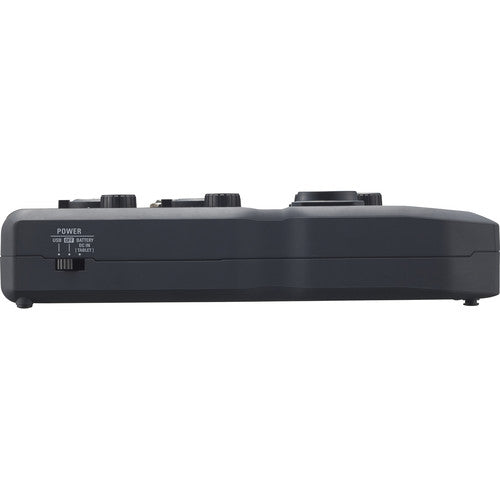
The bus-powered U-24 packs all the essential tools into a compact form factor that fits in the palm of your hand. Record with mics, instruments, and more at home or on the go—the U-24 is iPhone/iPad* compatible and small enough to take anywhere. It can even run on just two AA batteries for recording in the most remote locations.
* Requires 2 AA batteries or an optional AC adapter for power, plus an Apple iPad Camera Connection Kit or Lightning-to-USB Camera Adapter for connection to iPhone/iPad.

Inspired by our Zoom H-series recorders, the U-24 is equipped with high-performance, low-noise mic preamps (-119.5 dB EIN) that enable recording and playback at resolutions up to 24-bit/96 kHz. You can also use U-24 as a studio-quality headphone amp and listen to your favorite music in full fidelity
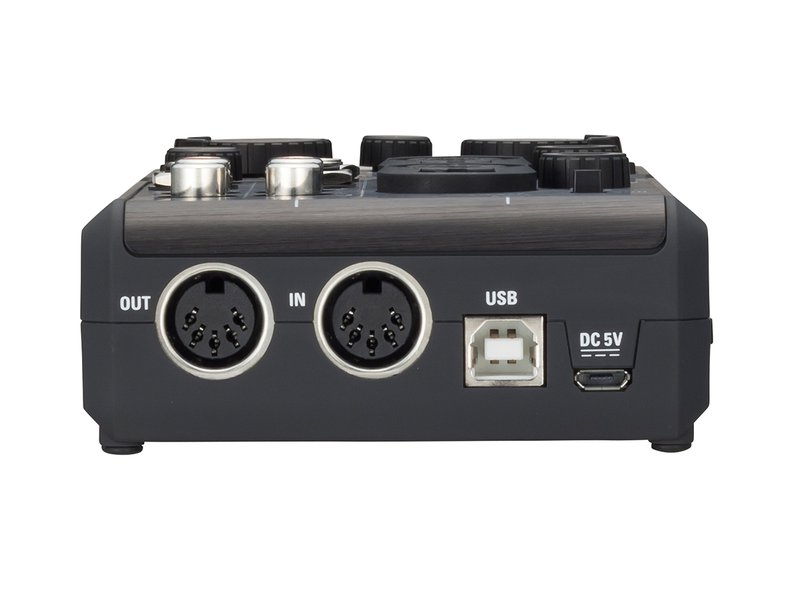
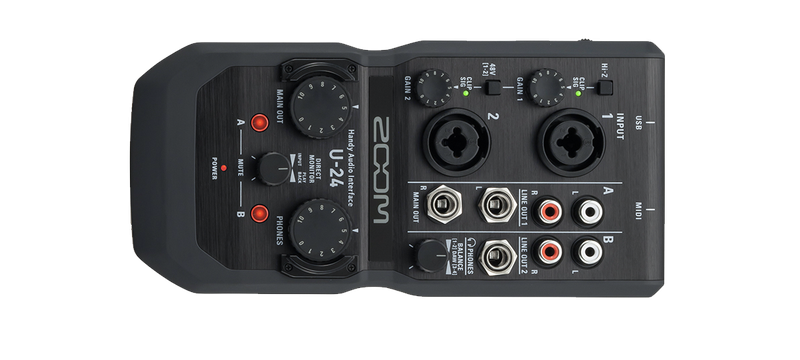
The U-24 is equipped with an essential collection of inputs and outputs for streamlined recording. Two combo inputs with independent gain knobs and multi-color level indicators allow you to connect mics, keyboards, mixers, and more. 48V phantom power can be supplied to both inputs, and input 1 supports Hi-Z for connecting guitars, basses, or other passive instruments. MIDI input and output jacks allow you to use devices like keyboards, controllers, synthesizers, and drum machines.
Separate TRS and RCA output jacks provide multiple options for connecting DJ mixers, monitors, and other gear. Finally, an independent headphone output with dedicated volume control gives you complete flexibility while monitoring.

The U-24 has flexible monitoring options for dialing in the perfect mix with zero latency. Balance the cue and main out signals when you’re DJ’ing, or create a mix of click track and main out signals during live performances. Each connector and knob is strategically positioned for fast access, so you can set up and control the U-24 with ease.

| Form Factor | Desktop |
| Display | None |
| Channels of I/O |
Analog: 2 Inputs / 4 Outputs |
| Maximum Sampling Rate | 96 kHz / 24-Bit |
| Number of Microphone Preamps | 2 Preamps |
| Input Level Adjustment | 2 x Knob |
| Expansion Slots | None |
Signal Processing
| Pad | None |
| Gain/Trim Range |
Inputs: 0 to 43 dB |
| High-Pass Filter | None |
| Solo/Mute | Mute per Master |
Connectivity
| Analog Audio I/O |
1 x Combo XLR-1/4" TRS Balanced/Unbalanced Mic/Line/Hi-Z Input 1 x Combo XLR-1/4" TRS Balanced/Unbalanced Mic/Line Input 2 x 1/4" TRS Balanced Monitor Output 2 x Stereo RCA Coaxial Unbalanced Line Output 1 x 1/4" TRS Unbalanced Headphone Output |
| Phantom Power | 48 V, Selectable On/Off (Applied to All Inputs) |
| Digital Audio I/O | None |
| Host Connection / USB | 1 x USB-B (Class-Compliant) |
| Host Connection Protocol | USB 2.0 |
| USB (Non-Host) | 1 x Micro-USB (Power Input) |
| Sync I/O | None |
| Network I/O | None |
| MIDI I/O |
1 x DIN 5-Pin Input 1 x DIN 5-Pin Output |
| Wireless Connectivity | None |
Performance
| Frequency Response |
System: 20 Hz to 20 kHz +0/-1 dB (at 44.1 kHz) 20 Hz to 40 kHz +0/-3.5 dB (at 96 kHz) |
| Maximum Input Level |
Line Inputs: +20.7 dBu Mic Inputs: +2.7 dBu |
| Maximum Output Level |
Monitor Outputs: +10 dBu at 0 dBFS Line Outputs: +8 dBu at 0 dBFS Headphone Outputs: +10 dBu at 0 dBFS |
| Headphone Output Power | 30 mW per Channel into 32 Ohms |
| Impedance |
Mic Inputs: 2.6 Kilohms Hi-Z Inputs: 1.1 Megohms Monitor Outputs: 1 Kilohm Line Outputs: 330 Ohms Headphone Outputs: 33 Ohms |
| EIN |
Inputs: -119.5 dBA (150-Ohm Source) |
Digital Audio
| Sample Rates | 44.1 / 48 / 88.2 / 96 kHz |
| Sample Rate Conversion | None |
| Bit Depths | 24-Bit |
| Latency | Zero-Latency Direct Monitoring |
| Sync Sources | Internal |
Audio Storage & Playback
| Memory Card Slot | None |
Compatibility
| OS Compatibility | macOS 10.9.5 or Later Windows 7 or Later (32/64-Bit) iOS 7.1 or Later *As of November 2021: Check with the manufacturer for the most up-to-date compatibility |
| Included Software | Ableton Live Lite |
| Compatible Software (Not Included) | Any Core Audio (Mac) Compliant Software |
| Supported Drivers/API & Plug-Ins | macOS Class-Compliant (No Driver Needed) Windows Driver Downloadable from Manufacturer |
| Processor Requirement | Intel Core i3 |
| Mobile Device Compatibility | iPhone iPad |
| Required Hardware | Available USB 2.0 Port or USB 3.0 / 3.1/3.2 Gen 1 Port USB Cable (Included) |
| Internet Connection | Required for Registration, Software/Driver Download |
Power
| Power Requirements | AC/DC Power Adapter (Not Included), Battery, or USB Bus Power |
| AC/DC Power Adapter | 5 VDC (Not Included) |
| Power Consumption | 5 W (Maximum) |
| Battery Type | 2 x AA |
| Approximate Battery Life | 4 Hours (Phantom Off) |
Physical
| Dimensions | 7.55 x 3.63 x 1.68" / 19.18 x 9.23 x 4.27 cm |
| Weight | 10.1 oz / 285.0 g |
Packaging Info
| Package Weight | 1.35 lb |
| Box Dimensions (LxWxH) | 9.291 x 6.772 x 2.284" |
In today's digital age, ensuring your children's safety while they browse the internet is paramount. As they explore the vast online world through smartphones, gaming consoles, laptops, and other devices, it's essential to implement measures to shield them from potentially harmful content and interactions. Here are some tips to help you safeguard your children online:
Open and ongoing communication with your children about online safety is crucial. Discuss the potential dangers they may encounter online, such as pornography, cyberbullying, and violent content. Encourage them to come to you with any concerns or questions they may have.
Establish clear rules and boundaries regarding internet usage. Define appropriate time limits for browsing and specify which websites and apps are off-limits. Make sure your children understand the consequences of violating these rules. You can also restrict some of these apps or online content utilizing device level parental controls explained below.
Take advantage of the parental control features available on devices and internet browsers. These controls allow you to block access to specific websites, set age-appropriate content filters, and monitor your children's online activities. Familiarize yourself with the parental control options on smartphones, gaming consoles, and laptops to effectively manage your children's online experiences.
Stay informed about the latest trends and technologies related to online safety. Familiarize yourself with popular social media platforms, gaming communities, and messaging apps that your children may use, including the functions they provide. This knowledge will help you understand the potential risks and take appropriate action to protect your children.
Regularly monitor your children's online activities to ensure they are adhering to the rules and staying safe. Keep an eye on their browsing history, social media interactions, and messaging apps. Be vigilant for any signs of cyberbullying or exposure to inappropriate content.
Teach your children about the importance of practicing safe online behavior. Remind them never to share personal information, such as their full name, address, or phone number, with strangers online. Encourage them to think critically about the content they encounter and to report anything that makes them feel uncomfortable or unsafe.
Be a positive role model for your children by demonstrating responsible and respectful online behavior yourself. Show them how to navigate the internet safely and responsibly, and emphasize the importance of treating others with kindness and empathy online.
For additional resources and guidance on online safety, visit the Australian e-Safety Commissioner's website at www.esafety.gov.au. Here, you'll find a wealth of information, including tips for parents, educational resources for children, and tools for reporting online abuse and harassment.
You can also report abuse through the website’s online form.
By following these tips and utilizing available resources, you can help keep your children safe from pornography, cyberbullying, violent content, and other unsafe material while they navigate the internet. Remember, proactive measures and open communication are key to fostering a safe and positive online environment for your family.

Excellent service
Great product. I have to buy the adapter separately for Australia as this came with the japanese plug.
Great, excellent quality product. Delivered in record time. Highly recommended.